How to Write Corporate Meeting Minutes | Free Corporate Meeting Minutes Template
Saving time and effort with Notta, starting from today!
Minutes aren’t another form you need to fill out. They’re a corporation’s official record that guides decisions and priorities.
It’s a serious responsibility, but taking minutes doesn’t have to be overwhelming. With the right corporate meeting minutes template, you keep accurate and reliable records every time.
In this article, we’ll walk through what corporate minutes are, how the requirements differ from board minutes, the elements every record needs, and share free templates to keep your meetings on track.
What Are Corporate Meeting Minutes?
Corporate meeting minutes are an official written record of a company’s internal or departmental meetings. They document the date, time, attendees, agenda, and meeting results.
Employees and managers use minutes to review what happened, track decisions, and follow up on tasks. Since employees consider 71% of meetings to be unproductive, teams rely on minutes to turn discussion into action.
Not all meeting minutes serve the same purpose. Companies use different types depending on the context, including:
Board meeting minutes. Record directors’ discussions, motions, and strategic decisions.
Annual meeting minutes. Document shareholder matters such as elections, financial reports, and resolutions.
Departmental or team minutes. Track everyday discussions, decisions, and follow-up tasks within internal teams.
Now that we've defined corporate meeting minutes and their types, let's examine when legal requirements apply to your records.
What Are the Legal Requirements for Corporate Meeting Minutes?
Regular corporate meeting minutes (for departmental or internal meetings) don’t carry strict legal mandates in the U.S. Organizations treat them as internal records that support accountability and clarity, but there are no legal obligations to keep them
Board and shareholder meeting minutes, however, do face legal requirements. State corporate law mandates that corporations maintain meeting minutes. These requirements vary by jurisdiction but typically apply to board and shareholder meetings.
For example, under Delaware law, “one of the officers shall have the duty to record the proceedings of the meetings of the stockholders and directors in a book to be kept for that purpose.” Courts may review these records in audits, litigations, or regulatory inquiries, so incomplete corporate meeting minutes will increase your legal risk.
Always consult with a legal professional in your own state or country to ensure full compliance with local laws.
What Should Corporate Meeting Minutes Include?
Meeting minutes lose their value if they don’t include the right elements.
Corporate meeting minutes must include five key elements to create complete and legally sound records. List the meeting date and time, attendees, decisions and motions, action items with deadlines, and confirmation of adjournment.
Include the basics below to make sure every record is clear, practical, and easy to use.
Meeting Date, Time, and Location
Start every set of minutes with the date, time, and location of the meeting. These details anchor the record so that readers understand the context.
Noting the time also shows how long the team met, which can help managers evaluate meeting efficiency.
Documenting Attendance
List everyone who attended and everyone who missed the meeting. This creates clarity about who took part in the discussion and who needs to catch up afterward.
If guests or substitutes join a meeting, write down their names and roles so the record reflects their contributions.
Recording Motions, Votes, and Resolutions
Corporate meetings include team decisions, but they rarely involve formal legal motions. Record specifics about what the group decides, agrees on, or approves during the meeting.
Write decisions in clear, concrete language. For example: “The marketing team agreed to launch the new campaign on October 15.”
Action Items and Deadlines
Document every task that comes out of the meeting. Assign each task to an owner and set a clear deadline.
This section turns minutes into a working tool. Action items hold employees accountable and keep projects moving forward.
Adjournment and Approval
End the minutes by writing down the time the meeting ended. This gives the record a clear beginning and end.
If your company requires approval, ask the meeting leader to review and confirm the minutes before you share them with the team.
With these five essential elements in mind, let's look at ready-made templates that incorporate each component.
Where Can I Find Free Corporate Meeting Minutes Templates?
Your team meets in person or on Zoom, ideas bounce back and forth, and decisions pile up quickly. By the end, everyone feels energized, but a few days later, no one remembers who said what or when that deadline was.
If you have ever felt unsure about how to record it all, feel free to use our ready-to-use templates that cover the most common corporate meeting types.
The basic template fits routine team meetings with agendas and action items. The board meeting template records formal motions, votes, and strategic decisions. The annual meeting template captures shareholder matters, including director elections, financial approvals, and governance resolutions.
A Basic Template for Corporate Meeting Minutes
Meeting Title: [Team/Department Name] Meeting
Date: [MM/DD/YYYY]
Time: [Start – End]
Location: [Office/Virtual Platform]
Recorder: [Name]
Attendees:
[List names and roles]
Agenda:
[Topic 1]
[Topic 2]
[Topic 3]
Discussion & Notes:
Topic 1: Key discussion points, decisions made, action items.
Topic 2: Key discussion points, decisions made, action items.
Topic 3: Key discussion points, decisions made, action items.
Decisions Made:
[Decision 1]
[Decision 2]
Action Items:
[Task] — [Owner] — [Due Date]
[Task] — [Owner] — [Due Date]
Next Meeting: [Date/Time]
Best for routine team or departmental check-ins. It keeps track of agenda items, decisions, and action items tied to everyday work.
Corporate Board Meeting Minutes Template
Organization: [Company Name]
Board Meeting Date: [MM/DD/YYYY]
Location: [Office/Virtual Platform]
Called By: [Chairperson’s Name]
Recorder: [Secretary’s Name]
Directors Present:
[List of Board Members]
Directors Absent:
[List if any]
Agenda:
Approval of previous minutes
Financial report
Strategic initiatives updates
Risk/compliance updates
New business
Meeting Proceedings:
Approval of Minutes: [Approved/Amended/Revised]
Financial Report: Summary of financial results, key highlights, and board questions.
Strategic Updates: Progress reports on major initiatives.
Risk & Compliance: Notable updates or issues.
New Business: Items raised, discussions held, next steps.
Motions & Votes:
Motion: [Description] → Outcome: [Approved/Denied/Deferred]
Motion: [Description] → Outcome: [Approved/Denied/Deferred]
Adjournment: [Time]
Choose this format to create board meeting minutes. It highlights motions, votes, and high-level strategic decisions.
Annual Corporate Meeting Minutes Template
Company: [Company Name]
Annual Meeting of Shareholders
Date: [MM/DD/YYYY]
Location: [Office/Virtual Platform]
Recorder: [Secretary’s Name]
Attendees:
[List shareholders present or represented by proxy]
Agenda:
Election of directors
Review of annual financial statements
Appointment of auditors
Approval of executive compensation (if applicable)
Other shareholder business
Proceedings:
Director Elections: [Names of elected/re-elected directors]
Financial Review: Summary of key financial results and approval of annual statements.
Auditor Appointment: [Firm Name] appointed/renewed as auditor.
Compensation Decisions: Summary of resolutions on executive pay.
Other Business: Notes on shareholder questions, motions, and resolutions.
Resolutions Passed:
[Resolution 1]
[Resolution 2]
Adjournment: Meeting adjourned at [Time].
Use this template for the company’s required yearly meeting with shareholders. It records director elections, financial approvals, and resolutions that impact governance.
Save time by downloading all three templates in Microsoft Word and Google Docs formats. Each template includes fill-in-the-blank fields, instructional notes, and formatting that meet professional corporate standards.
Templates provide structure, but manually filling them out is time-consuming and repetitive. Modern transcription tools like Notta automate this process. Let’s see how.
How to Write Better Corporate Meeting Minutes with Notta
Writing corporate meeting minutes doesn’t have to feel like a chore. Instead of filling out every detail manually, you can use Notta to create accurate corporate meeting minutes, from a basic team check-in to a corporate board meeting.
Register or Sign Up
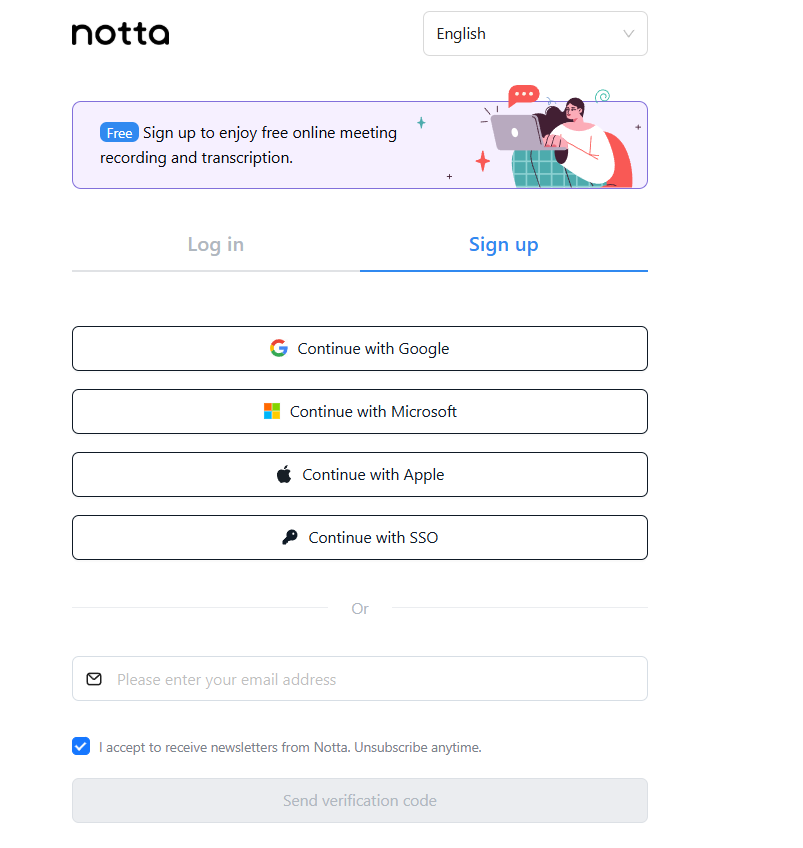
Open Notta and log in or sign up via Google, Microsoft, or Apple account.
Record Your Meeting
Click the ‘Record online meeting’ button in the top menu. 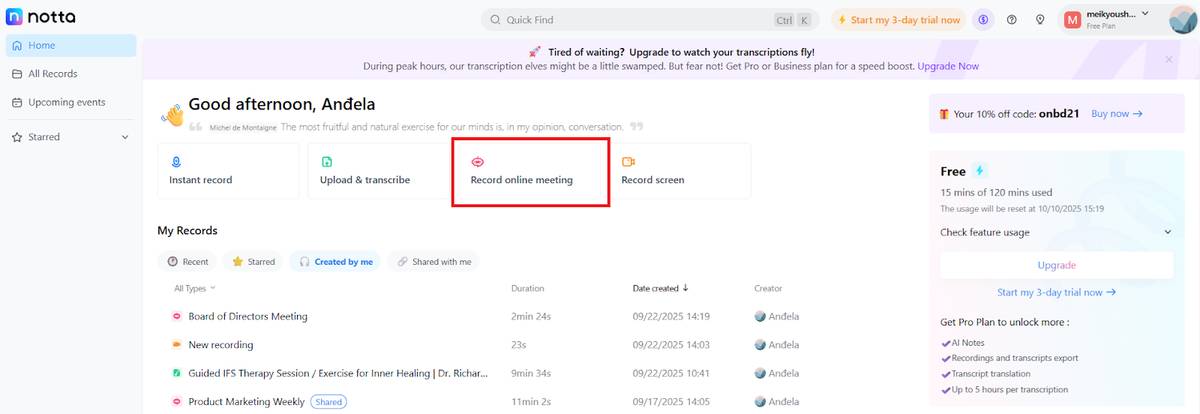
Paste the meeting link in the new window and click ‘Transcribe now’. Notta can transcribe and summarize meetings from Zoom, Microsoft Teams, Google Meet, and Webex. You can also choose between monolingual and bilingual transcription here.
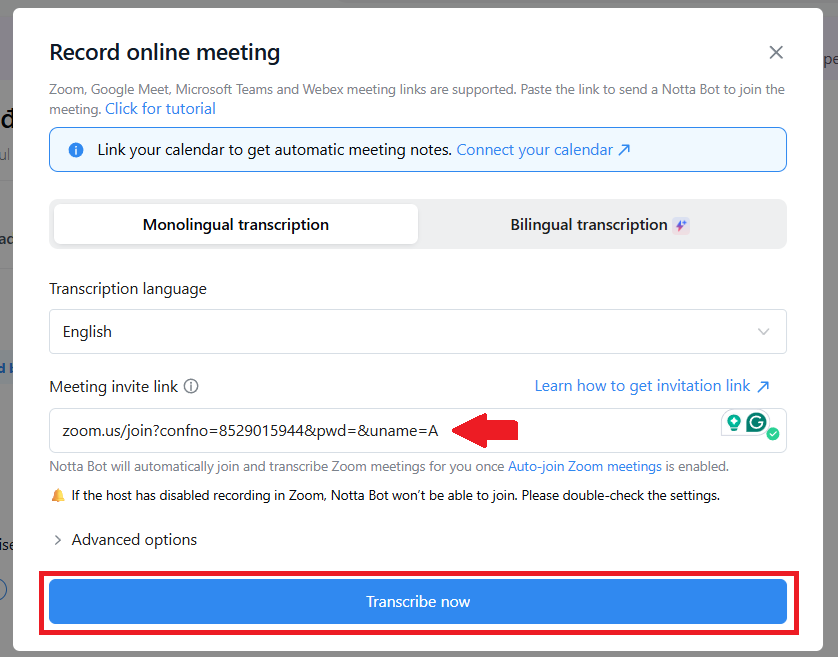
The Notta bot automatically joins your meeting, and you can follow the transcription in real-time.
Summarize, Edit, and Share
After the meeting ends, Notta will open a summary window with pre-selected templates. Choose the template you prefer and click ‘Generate Now’ to create your meeting summary.
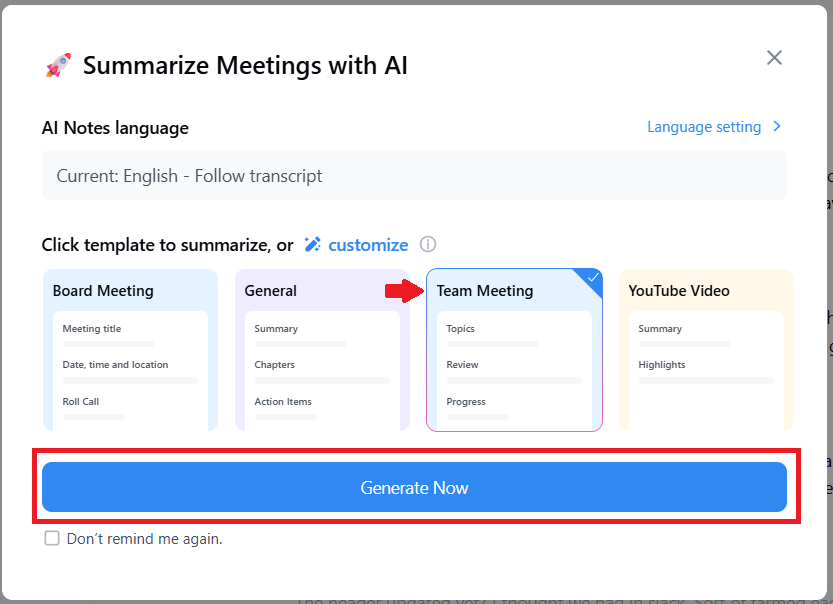
Notta will create time-stamped, actionable summaries in just a few seconds. You can find the full summary on the left side of the dashboard.
Bonus: Notta has a library of 32 built-in templates, and you can also design your own to customize notes for recurring meetings.
Review your notes and refine them into professional corporate meeting minutes.
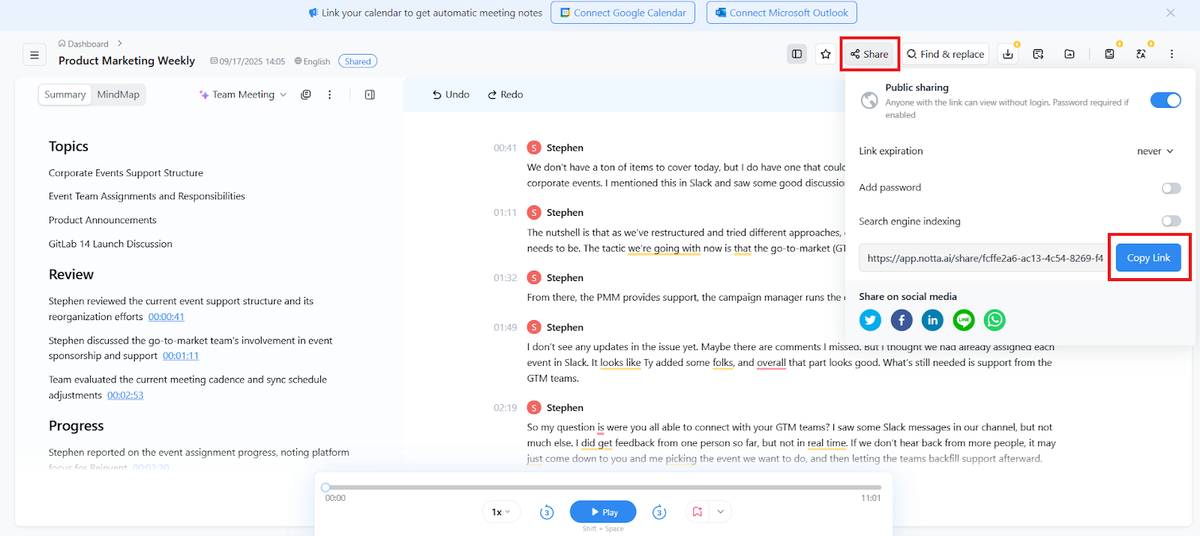
Share your notes by clicking the ‘Share’ button from the top-right menu. Add a password if you want extra protection, then click ‘Copy Link’ and distribute the minutes to the right people.
Once you have your meeting transcript or notes ready, you can use AI infographic generator to convert your meeting into clear, presentation-ready infographic to share with your team.
What Are the Best Practices for Taking and Storing Meeting Minutes?
A good template will help today, but these best practices will improve the value of your minutes. These practices include using consistent templates, maintaining objectivity, highlighting action items, storing records securely with encryption, distributing minutes quickly, and maintaining proper backups.
Here’s how to write and store them so they hold up over time.
Use a consistent template. Keep the same format for each meeting. Consistency makes your minutes easier to read and follow.
Record key details. Note the date, time, attendees, and agenda right at the top. These basics give context and frame the rest of the record.
Keep notes objective. Document the main points and decisions. Skip opinions, filler, and side conversations that don’t move the meeting forward.
Highlight action items. Write down tasks, assign owners, and set deadlines. Clear accountability ensures follow-through after the meeting ends.
Store minutes in a secure, shared location. Store minutes in a secure, shared system with built-in encryption and access controls. That way, the right people can review them easily, while sensitive information stays protected from outsiders.
Organize by date or project. File minutes in a way that makes sense for your team. A clean organization saves time when you need to revisit past meetings.
Distribute minutes quickly. Send them out while the meeting is still fresh. We forget 50–70% of what we hear within a day, so fast distribution helps keep details alive and actionable.
Back up your records. Keep a copy in the cloud or another secure system. Since 37% of backups fail when you need them, having multiple copies makes sure your records don’t disappear.
Frequently Asked Questions About Corporate Meeting Minutes
What is the proper format for corporate meeting minutes?
The proper format for taking corporate meeting minutes is to list the date, time, location, attendees, agenda items, key discussions, decisions, and action items. This structure ensures the minutes are complete and easy to reference.
Who is responsible for taking corporate meeting minutes?
The person responsible for taking corporate meeting minutes is usually the meeting secretary or a designated recorder. In smaller companies, it’s usually an administrative assistant or rotating team members.
Is there a difference between board meeting and annual meeting minutes?
The difference between board meeting and annual meeting minutes is what they document. Board minutes record directors’ motions, votes, and strategic decisions, while annual minutes document shareholder matters like elections, financial reviews, and resolutions.
What are Robert's Rules of Order for meeting minutes?
Robert’s Rules of Order for meeting minutes are a standard method of documentation. They require you to record the type of meeting, date, attendance, motions, votes, and outcomes. The rules emphasize accuracy and neutrality without including debates or opinions.
Can ChatGPT write the minutes of a meeting?
ChatGPT can only write the minutes of a meeting if you provide a transcript or notes. It can summarize discussions, highlight decisions, and list action items, but you should always review for accuracy. ChatGPT can’t record meetings or transcribe in real time, so a dedicated AI note-taking tool is better for writing meeting minutes

