
Verbatim Transcription Example: How to Transcribe Word-for-Word
Saving time and effort with Notta, starting from today!
Verbatim transcription requires you to write down everything you hear: fillers, pauses, stutters, and all the unscripted moments in between. It’s a long, tedious process, and the room for error is slim to none.
Luckily, the right system makes everything easier.
This guide walks you through the basics of verbatim transcription, shows you practical examples, and explains how the right tools make the entire process smoother.
What Is Verbatim Transcription?
Verbatim transcription is an exact replication of spoken audio that captures everything a speaker says, as well as fillers, pauses, false starts, and non-verbal cues. It preserves the exact way someone speaks, which makes it useful for legal proceedings, academic research, and any situation where accuracy and nuance matter more than readability.
What is the Difference Between Full Verbatim and Clean Verbatim?
Full verbatim includes every filler word and stutter for legal and academic use, while clean verbatim removes these elements for improved readability in business contexts.
| Transcript Element | Full Verbatim | Clean Verbatim |
|---|---|---|
| Filler words (“uh”, “umm”...) | Included | Removed |
| Stutters and false starts | Included | Removed |
| Grammar | Unedited | Lightly corrected |
| Non-verbal sounds (laughter, cough) | Included with tags | Removed unless relevant |
| Readability | Lower | Higher |
| Common uses | Legal, research, linguistics | Business, media, content |
Full verbatim transcription captures everything exactly as it is spoken, including filler words, stutters, false starts, repetitions, pauses, and non-verbal sounds like laughter. It doesn’t just show what was said but how it was said. This level of detail is necessary in legal records, linguistic analysis, and detailed research.
Clean verbatim transcription edits out those speech habits to improve readability while keeping the speaker’s original meaning. It removes filler words, corrects obvious grammatical errors, and smooths awkward phrasing. This style works better for business meetings, interviews, podcasts, and general documentation where clarity matters more than precise speech patterns.
Why Is Word-for-Word Accuracy Important?
Word-for-word accuracy protects against misinterpretation when a transcript functions as an official record. Even small changes in wording shift meaning or responsibility, especially when people use transcripts to make decisions or review evidence. Exact phrasing protects everyone involved by reducing the risk of misinterpretation and disputes over meaning.
A real example shows how serious the consequences can be. In 2011, Colombian aviation consultant Carlos Ortega was wrongly arrested and extradited to the US after prosecutors relied on faulty wiretap transcripts that confused him with another man named Carlos. The mistake led to a year in prison and over $300,000 in legal costs.
Word-for-word accuracy also matters outside the legal system. In research, inaccurate transcripts distort participant responses and weaken study results. In healthcare, mistranscribed symptoms or instructions affect diagnosis and treatment. In journalism and business, a single incorrect word can damage credibility and may create legal risks.
What is an Example of a Verbatim Transcription?
Despite being word-for-word, verbatim transcription isn’t one-size-fits-all. The level of detail and formatting varies depending on the context and purpose of the transcript.
Let’s take a look at five examples of verbatim transcription in different situations.
Example 1: Full Verbatim Transcript (Raw Audio)
Let’s take a look at what a full verbatim transcript looks like, captured exactly as spoken. It includes fillers, false starts and interruptions.
Speaker 1: Uh, so I, I think the project update was supposed to be sent yesterday, right?
Speaker 2: Yeah, but I didn’t, um, get the final numbers until late, so I’m sending it today.
Speaker 1: Okay… well, let’s, uh, make sure the team knows.
Example 2: Clean Verbatim Transcript (Edited)
Same raw audio as the previous example, but a more readable version. It removes fillers, repeated words, and hesitations while preserving the core message.
Speaker 1: I think the project update was supposed to be sent yesterday, right?
Speaker 2: Yes, but I didn’t get the final numbers until late, so I’m sending it today.
Speaker 1: Okay, let’s make sure the team knows.
Example 3: Intelligent Verbatim vs. True Verbatim
A side-by-side view of how meaning stays the same for the same audio, but readability improves.
True Verbatim:
“I, uh, kinda feel like we should maybe push the deadline? It’s, um, not realistic.”
Intelligent Verbatim:
“I feel like we should push the deadline. It’s not realistic.”
Example 4: Legal Transcription Sample
Legal transcripts follow full verbatim standards to maintain an accurate record of testimony.
Attorney: Uh, where were you on the night of March 12?
Witness: I was at home, um, around nine p.m., watching television.
Attorney: Did anyone else come to the house?
Witness: No… no, not that I remember.
Example 5: Focus Group Interview Sample
Focus groups include interruptions, quick opinions and side comments that reveal authentic customer sentiment. Convert your focus group transcript into clean verbatim to improve readability.
Moderator: When you first opened the new homepage, what stood out to you?
Participant 1: The banner image. It was huge and kind of distracting.
Participant 2: Yeah, same. I thought it looked… I don’t know, too busy?
Participant 3: I actually liked it. It felt more energetic than the old one.
Participant 2: True, but it took a while to load for me.
Participant 4: And the search bar was harder to find. I had to scroll.
Moderator: So overall, mixed reactions, but loading time and layout seem to be the main issues?
What is the Difference Between Verbatim and Non-Verbatim?
Verbatim transcription is a word-for-word account of speech, including grammar errors and fillers for legal and research reasons. Non-verbatim transcription edits speech for clarity and removes imperfections for business, journalism, and other uses.
| Feature | Verbatim Transcription | Non-Verbatim Transcription |
|---|---|---|
| Level of detail | Captures every spoken word and sound | Edits speech for clarity and readability |
| Filler words | Includes “um,” “uh,” “you know,” etc. | Removes filler words |
| Grammar | Preserves original grammar and errors | Corrects grammar and restructures sentences |
| Repetitions | Keeps all repetitions and false starts | Removes repeated or restarted phrases |
| Non-verbal sounds | Includes [laughter], [pause], [cough], etc. | Omits most non-verbal sounds |
| Readability | Harder to read | Easy to read |
| Common use cases | Legal, research, linguistic analysis | Business meetings, journalism, interviews, content creation |
Verbatim transcription captures every detail in speech, including filler words, repetitions, grammar errors, and non-verbal sounds. It prioritizes accuracy over readability for legal, research, and linguistic work. Non-verbatim transcription removes fillers and false starts, cleans up grammar, and skips most non-verbal cues. It creates a cleaner transcript for business meetings, interviews, and general content.
How Do You Handle Filler Words?
Keep filler words in for verbatim transcription, but edit them out for non-verbatim. Everyday conversation naturally includes pauses and hesitation sounds, and research by Fox Tree shows that fillers make up about 6% of spontaneous speech.
Verbatim transcription keeps “um,” “uh,” and “you know” to reflect how people talk. Non-verbatim transcription removes them so the text is clean without changing the speaker’s intended meaning.
Should You Include Stutters and False Starts?
Include stutters and false starts in verbatim transcription and remove them in non-verbatim transcription. These cues show how a speaker thinks and reacts, which matters when analyzing tone, confidence, or emotional state. A line like “I’m not… I’m not sure that’s a good idea” sounds cautious, while the clean version “I’m not sure that’s a good idea” is more direct.
How Do You Transcribe Non-Verbal Sounds and Background Noise?
Include non-verbal sounds in verbatim transcription because they add context and show how someone reacted or delivered a message. Note them in brackets, like “[laughter],” “[sigh],” or “[door closes].” A simple cue like “[long pause]” signals hesitation or tension that matters during analysis. Non-verbatim transcription removes most of these sounds unless they directly affect meaning.
Common non-verbal tags include:
[laughter] for audible laughing
[sigh] / [cough] / [clears throat] for vocal non-verbal sounds
[pause] / [long pause] for silence that affects tone
[door closes], [typing], [phone ringing] for environmental noise
[background noise] or specific cues like [door closes], [typing], [phone ringing] for environmental context
When Should You Use Verbatim Transcription?
Use verbatim transcription when every word or pause matters for tone. Industries like legal, academic research, and media rely on true verbatim records because small details in delivery change interpretation. Verbatim transcription is also important in therapy, journalism, and any other setting where speech details influence interpretation.
Legal Proceedings and Court Transcripts
Courts and legal teams use verbatim transcripts because even a single word or pause can influence interpretation. Verbatim ensures an exact record of testimony, depositions, and hearings, which helps attorneys, judges, and juries review what was said without any editorial changes.
Qualitative Research and Academic Interviews
Researchers study speech as a whole, which means the delivery matters as much as the content. Verbatim transcription preserves tone, fillers, emotional cues, and conversational patterns that researchers use to map behaviours and support findings. That level of detail matters in fields like psychology, sociology, anthropology, and linguistics.
Media, Film, and Scripting
Creative teams use verbatim transcripts to preserve the natural rhythm of unscripted speech. Directors and editors use these nuances to shape dialogue, build character voice, and pull authentic moments for scripts.
When Is Non-Verbatim a Better Choice?
Non-verbatim transcription is a better choice when readability matters more than detail. Teams use non-verbatim to summarize meetings and share information quickly. Journalists rely on clean transcripts to pull accurate quotes without extra clutter. Podcasters, creators, and marketers also prefer non-verbatim because it produces a polished version of the conversation that’s easier to repurpose into articles, reports, and social content.
How Do You Transcribe Word-for-Word? A Step-by-Step Guide
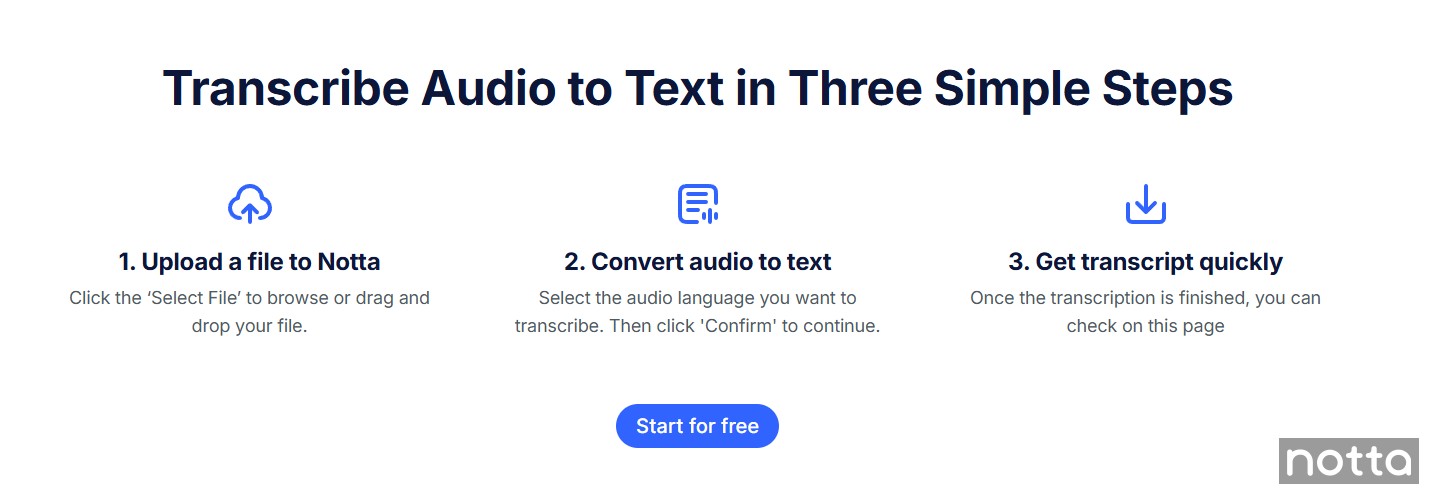
Start transcribing word-for-word by drafting every sound and filler. Add timestamps and speaker labels so the transcript is easy to follow. Note non-verbal cues like laughter or long pauses. Finish by reviewing the audio again to catch mistakes and ensure accuracy.
Step 1: Typing the First Draft
Start by listening to the audio in short segments and typing exactly what you hear, including fillers like “um,” “uh,” and repeated words. Pause and rewind if you need to, but focus on getting everything down rather than making it perfect on the first pass.
Step 2: Timestamping & Speaker Identification
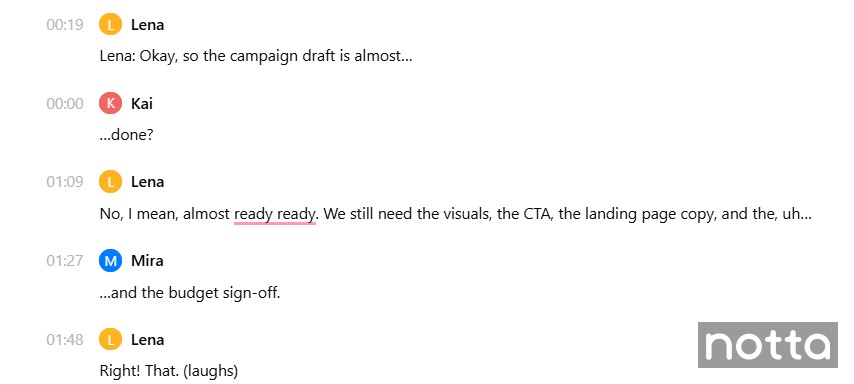
Add timestamps at regular intervals or at key moments so readers can find parts of the audio later. Label each speaker consistently with clear tags such as “Interviewer,” “Speaker 1,” or by name.
Step 3: Formatting Non-Verbal Cues
Insert non-verbal sounds and relevant background noise in square brackets, such as “[laughter],” “[long pause],” or “[phone ringing].” Use the same tag each time to create a readable transcript, so don’t write “[laughs]” in one line and “[laughter]” in another.
Pro Tip: Include non-speech sounds only if they affect meaning. Leave out irrelevant background noise, like birds chirping in the distance or a car passing by.
Step 4: Reviewing and Proofreading
Read through the transcript while listening to the audio again to catch any missed words, phrases, or speaker changes. Check spelling, punctuation, and formatting to ensure the transcript is accurate and easy to follow.
What are the Verbatim Transcription Rules and Formatting Guidelines?
Verbatim transcription follows strict formatting rules to accurately capture speech. Use tags for interruptions, overlap, slang, and non-verbal sounds, and follow consistent punctuation and capitalization. Include tags for unintelligible audio and use time codes to help readers navigate longer recordings.
How to Format Interruptions and Overlapping Speech
Use a double hyphen or em dash to show where a speaker is cut off, such as “I was going to say–”. When two speakers talk at the same time, mark the overlap with brackets or notes like “[overlapping]” before their lines. It helps the reader understand pacing and who interrupted whom.
Example:
Speaker A: I’m not sure if we should–
Speaker B: [overlapping] We already sent it.
Speaker A: –submit it today.
Rules for Capitalization and Punctuation
Capitalize proper nouns, the start of sentences, and all speaker labels like you would in standard writing. Match punctuation to what you hear so the transcript reflects the speaker’s delivery. Use ellipses when a speaker doesn’t finish a thought, question marks for rising intonation, and exclamation points when they show strong emotion.
Examples:
Ellipses (…) for unfinished sentences: “I thought we were meeting at… actually, never mind.”
Question marks (?) for rising intonation: “You sent it yesterday?”
Exclamation points (!) for strong emotion: “That’s amazing!”
Handling Slang and Dialects
Write slang exactly as speakers say it, whether it’s “gonna,” “innit,” or other regional phrasing. Avoid correcting dialects or informal speech, since that changes the meaning and tone. Add a brief note in brackets to clarify a slang term.
Example: “It’s gonna be lit [slang for ‘exciting’] tonight.”
Standard Tags for Inaudible or Unintelligible Audio
Use tags when you need to show sounds, gaps, or issues that affect how someone spoke. Tags help readers understand the full context of the conversation.
[inaudible] or [inaudible 00:12:47] marks audio you can’t hear clearly.
[unintelligible] marks speech you can hear but can’t understand.
[phonetic] indicates you spelled a word based on how it sounded because the correct spelling isn’t clear.
[garbled] marks distorted audio.
[redacted] shows intentionally removed or censored information.
Example: If anything else sounds off, we can mark it as [unintelligible] and verify later.
Using Timecodes Effectively
Insert timecodes at regular intervals or before key moments to help readers navigate the audio. Choose a consistent format, such as [00:02:15], and place it where it doesn’t interrupt the dialogue.
Example:
[00:05:12] Interviewer: What changed your mind about the proposal?
[00:05:18] Participant: The budget numbers, mostly.
Tools to Help You Create Verbatim Transcripts
Transcription tools help you create faster and more accurate verbatim transcripts. The most helpful features include adjustable playback speed, foot pedals for hands-free control, and AI transcription services that draft the transcript for you, so you can focus on reviewing details.
What Software Offers Variable Speed Playback?
Variable playback speed helps you slow the audio when someone talks fast or speed it up when you’re reviewing sections you already understand. Notta includes this feature, which makes it easier to catch subtle details like verbal pauses and filler words without replaying the same line ten times.
Should You Use Foot Pedals for Transcription Efficiency?
Foot pedals save significant time when you’re transcribing long audio manually since they let you pause or rewind without lifting your hands off the keyboard. They’re great for high-volume work. But if you’re using Notta, you don’t need one at all, because the app does the heavy lifting upfront and leaves you with a cleaner draft to review, rather than a blank page to type from scratch.
AI vs. Human Transcription: Can AI Do True Verbatim?
AI tools like Notta can get incredibly close to a verbatim transcript, but it won’t capture every stutter, half-finished sentence, or subtle emotional cue the way a human listener can. True verbatim still needs a human ear for the tiny details that don’t always come through in automated text.
It’s hard to argue with the time savings, though. The manual transcription process takes 4 hours per hour of audio (even for experienced transcriptionists), while Notta's AI can process one hour of audio in five minutes. That incredible speed difference makes AI an excellent starting point even when you need full verbatim accuracy.
Notta does ~98% of the work by giving you an accurate draft with speaker labels and timestamps. You can then do a quick pass to add the final verbatim touches, which saves time without losing precision.
Can Notta Create Verbatim Transcripts Automatically?
Notta automatically converts audio and video into text with ~98.86% accuracy. It transcribes meetings, interviews, or lectures in 58 languages, so you can record conversations in real-time or upload prerecorded audio files.
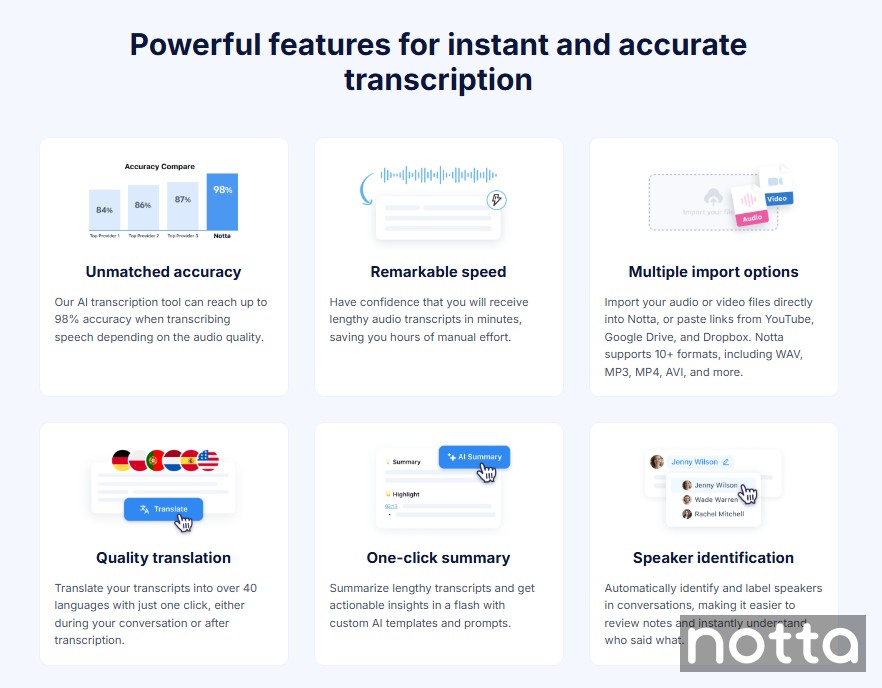
Notta doesn't create true verbatim transcripts, but it gives you a strong starting point. The AI captures almost everything for you, and you can edit the transcript directly from your Notta dashboard to add verbatim details.
Review the draft to add stutters, pauses, or nonverbal cues. You won't have to start from scratch, and you still keep full control over accuracy.
When you’re ready to share, you can export your transcript in your preferred format, including DOCX, PDF, TXT, or SRT.
Start transcribing with Notta and save yourself hours of work by turning your conversations into text instantly. Create a perfectly detailed verbatim transcript with far less effort!
Frequently Asked Questions (FAQs)
What is the difference between verbatim and word-for-word?
The difference between verbatim and word-for-word transcription is that verbatim captures every detail exactly as spoken, including filler words, false starts, and non-verbal sounds. Word-for-word transcription keeps only the spoken words and removes extra speech elements.
Do you correct grammar in verbatim transcription?
You do not correct grammar in verbatim transcription because the goal is to reflect the speaker’s exact wording. Grammatical mistakes, slang, and informal speech all remain in the final transcript.
How do you transcribe laughter and pauses?
You transcribe laughter and pauses by adding clear labels such as [laughter] or [pause] directly in the text. These markers help preserve tone, emotion, and conversational flow.
What is the standard accuracy rate for verbatim transcripts?
The standard accuracy rate for verbatim transcripts ranges from 98 to 99% with clear, high-quality audio. Background noise, accents, and overlapping speech can affect final accuracy.

