AI Textbook Note Taker: How Can AI Take Textbook Notes?
Saving time and effort with Notta, starting from today!
An AI textbook note taker is software that uses artificial intelligence and natural language processing (NLP) to read and summarize textbook content. It extracts key ideas, definitions, and examples from uploaded PDFs or scanned pages and turns them into structured study notes in minutes.
The best AI textbook note takers in 2025 include Notta's PDF Summarizer (best for quick summaries), Mindgrasp (best for quizzes), Coconote (best for visual learners), NoteGPT (best for chat-style interaction), and NotebookLM (best for researchers).
This guide explains how AI note-taking works, compares the top tools, and provides a step-by-step tutorial for transforming textbooks into study-ready notes.
What Is An AI Textbook Note Taker?
An AI textbook note taker uses artificial intelligence to read and summarize your textbooks automatically. You upload your chapters or PDFs, and it scans through the text and pulls out the main ideas, definitions, and examples for you. Instead of wasting hours highlighting and rewriting your textbooks, you get organized notes in under 5 minutes.
Saving time is only part of the benefit. The best AI note taker helps you spot what’s important and explain complex concepts. It handles the tedious parts of note-taking so you can focus on understanding the material, not just surviving exam season.
What Technology Powers AI Textbook Note-Taking?
AI tools use Natural Language Processing (NLP), a branch of artificial intelligence that helps computers understand human language to power AI note-taking. NLP models are trained on millions of text samples to recognize grammar, vocabulary, and meaning.
In textbook note-taking, NLP allows AI models to analyze sentence structure, spot key ideas, and condense long chapters into clear, usable notes. As a result, you can use them to:
Summarize chapters or sections into key takeaways
Highlight important terms and definitions
Organize notes by topic or heading
Extract examples, formulas, or data tables
Generate flashcards or quiz questions from your notes
Sync across devices so you can study anywhere
Can AI Handle Both Digital and Physical Textbooks?
Yes, AI can handle both digital and physical textbooks. You can upload digital textbooks directly into your app/platform. The AI scans each section, identifies main ideas, and creates readable summaries.
If you’re using a printed textbook, you’ll need to digitize it first. You can scan or photograph the pages, then upload them as PDFs. After that, the AI can read and summarize them just like any other document, saving you from manually typing or rewriting notes.
What Are The Benefits of an AI Textbook Note Taker?
AI textbook note takers offer six key benefits for students. They save time by eliminating manual note-taking and improving comprehension with structured summaries. These tools also organize information into searchable databases, automatically generate flashcards, support retention through active learning methods, and make it easy to study across multiple devices.
Saving Time and Increasing Efficiency
Using AI tools to skip the sorting and jump into active review helps you spend your limited time where it pays off. In a large college study, students who devoted more of their study time to active strategies (like summarizing and self-quizzing) scored up to 10 percentage points higher than peers who used passive methods.
Improving Comprehension and Retention
AI note takers mirror the learning science behind the Cornell Note-Taking Method. Cornell organizes information into cues and detailed notes to improve comprehension and active recall.
According to a Utah State University guide on the Cornell method, reviewing material within 24 to 48 hours and several times a week can improve long-term recall from around 20% to over 70%. AI tools make this proven approach faster and easier by automatically generating key points and summaries.
Creating Organized and Searchable Study Guides
AI tools automatically categorize topics, highlight key terms, and make everything searchable. You can find specific definitions, examples, or formulas in seconds. Think of it as a digital index of everything you’ve studied.
Generating Flashcards and Practice Quizzes Automatically
Some AI note takers don’t stop at summaries. They turn your notes into flashcards or quick quizzes, so your study material becomes something you can actively practice with instead of just rereading. It’s a more engaging way to reinforce what you’ve learned and make it stick.
How to Choose the Best AI Textbook Note Taker
Finding the right AI note taker is like choosing a study partner. You want one that keeps up, understands the material, and doesn’t make you do all the work.
The best tools help you learn faster and stay organized when your brain’s already at capacity.
Key Features to Look For in an AI Note Taker
The best AI textbook note takers include six essential features that
transform raw textbook content into effective study materials. They summarize key ideas, combine multiple sources, allow quick annotations, support fast search, generate study aids automatically, and sync across devices.
Textbook summarization: Look for tools that can extract key ideas, definitions, and examples directly from digital or scanned textbooks.
Lecture and reading integration: The best apps combine audio transcription with PDF or document uploads so you can study from multiple sources.
Highlighting and annotation: Choose one that lets you mark important passages and add personal notes right inside the transcript or text.
Searchable summaries: AI-powered keyword search helps you find concepts, formulas, or terms instantly.
Flashcard and quiz generation: Tools that convert your notes into study aids help reinforce material faster.
Cross-device sync: Make sure your notes stay updated across laptop, phone, and tablet so you can study anywhere.
What's the Difference Between Free and Paid AI Note Takers?
Free AI note takers are suitable for basic use. They usually include basic features like limited transcription, short summaries, and small file uploads. They’re great if you only need quick notes or want to see how AI fits into your study routine.
Paid versions are for dedicated students who want consistency, depth, and control. They come with faster processing, higher accuracy, unlimited uploads, and advanced features like flashcard generation, multi-language support, and editable summaries.
What are the Key Features of the Top 5 AI Textbook Note Taking Apps?
Five AI textbook note-taking tools lead the market with different strengths for various student needs. Free plans range from web-only access to 800 monthly transcription minutes, while paid plans start at $9.99 monthly and include features like unlimited uploads, flashcard generation, and multi-language support.
| Cost | Platform | Key features | Best for | |
|---|---|---|---|---|
| Notta’s PDF Summarizer | Free | Web | - Upload and summarize PDFs instantly - AI chat for follow-up questions - Supports multiple languages - No sign-up required - Copy, download, or share summaries | Students who want quick, accurate textbook & lecture notes |
| Mindgrasp | Basic $9.99/mo; Scholar $12.99/mo; Premium $14.99/mo | Web, iOS, Chrome Extension | - Upload PDFs, videos, links - AI notes & summaries - Flashcards & quizzes - Integrates with Canvas, YouTube, Docs | Students who want interactive learning with quizzes |
| Coconote | Free; Coconote Pro: $9.99; Family Plan: $189.99 (in-app) | Web, iOS, Android | - Convert lectures to notes - Auto flashcards & mind maps - Quiz generation - Study folders & sharing | Visual learners who like structured, multimedia notes |
| NoteGPT | Pro $9.99/mo; Unlimited $29.99/mo; Max $99.99/mo | Web, iOS, Chrome Extension | - AI summaries & mind maps - Flashcard creation - Chat with content - Export as TXT, PDF, DOC, etc. | Users who want a lightweight, chat-style notetaker |
| NotebookLM | Free; Google AI Pro $19.99 (in-app) | Web, iOS, Android | - Summarize multiple docs - Ask questions about sources - Auto topic grouping - Powered by Gemini | Researchers & deep learners |
Step-by-Step: Using Notta AI to Take Textbook Notes
Got a long chapter and a short deadline? Take a deep breath - you’ve got this. Let me show you how to turn a textbook into usable notes in minutes using Notta’s free PDF Summarizer.
Step 1: Prepare Your Textbook Document
Start by getting your textbook into a digital format. If you already have a digital version, save it as a single PDF for each chapter or section you plan to summarize.
If your book is printed, you’ll need to scan it first. Apps like Adobe Scan, Microsoft Lens, Apple Notes (Scan Documents), or Google Drive’s Scan feature work well.
Make sure the pages are well-lit, flat, and fully visible in each photo.
Export the file as a PDF with text (OCR) so the AI can read it accurately. Combine pages into one file per chapter, give it a clear name, and you’re ready to upload.
Step 2: Uploading Your Textbook PDF to Notta
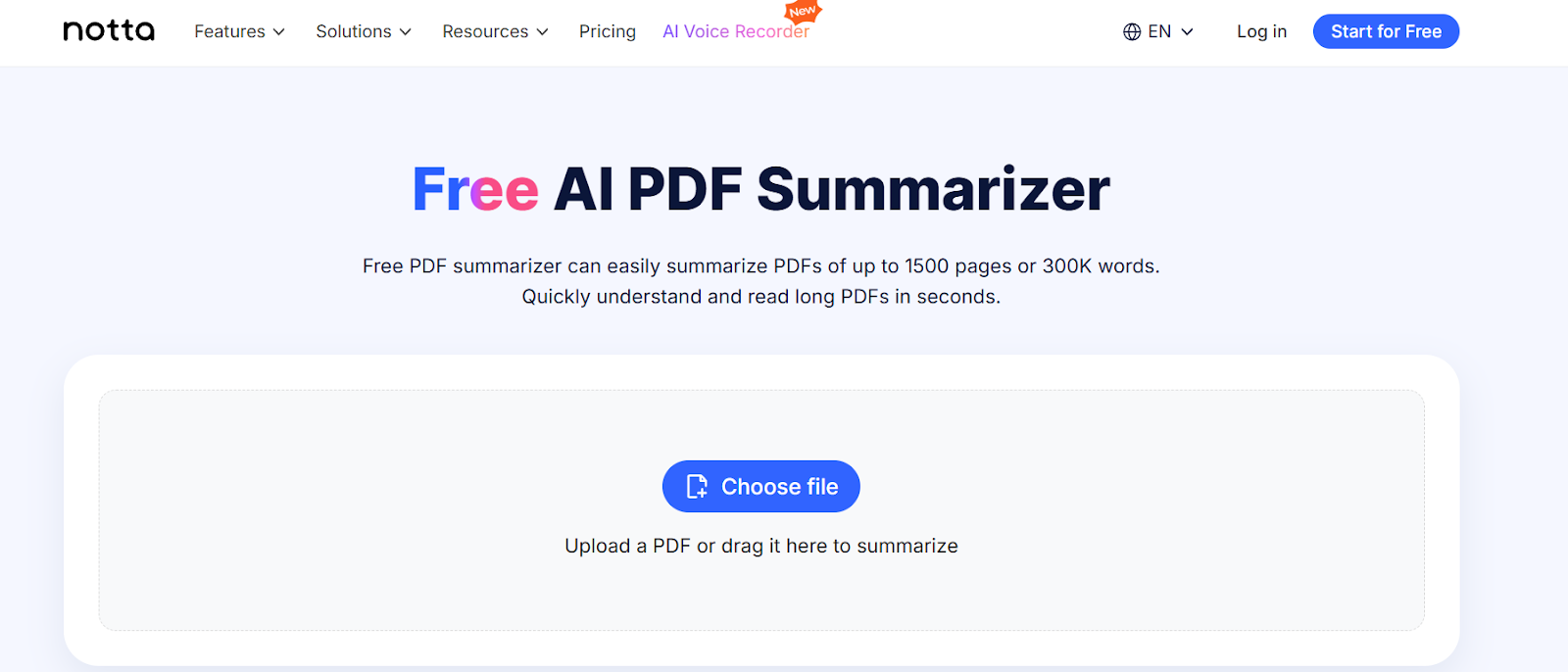
Head to Notta’s free PDF Summarizer, click ‘Choose file’ and select your textbook file. The upload only takes a few seconds, depending on the file size.
Step 3: Exporting and Using Your AI-Generated Notes
Notta will break down the material into a summary, highlights, and even a mind map view if you want to visualize connections between topics.
You can also use the AI chat to ask follow-up questions about your notes, like “How does this theory apply in real life?” or “Can you give me an example for this concept?”
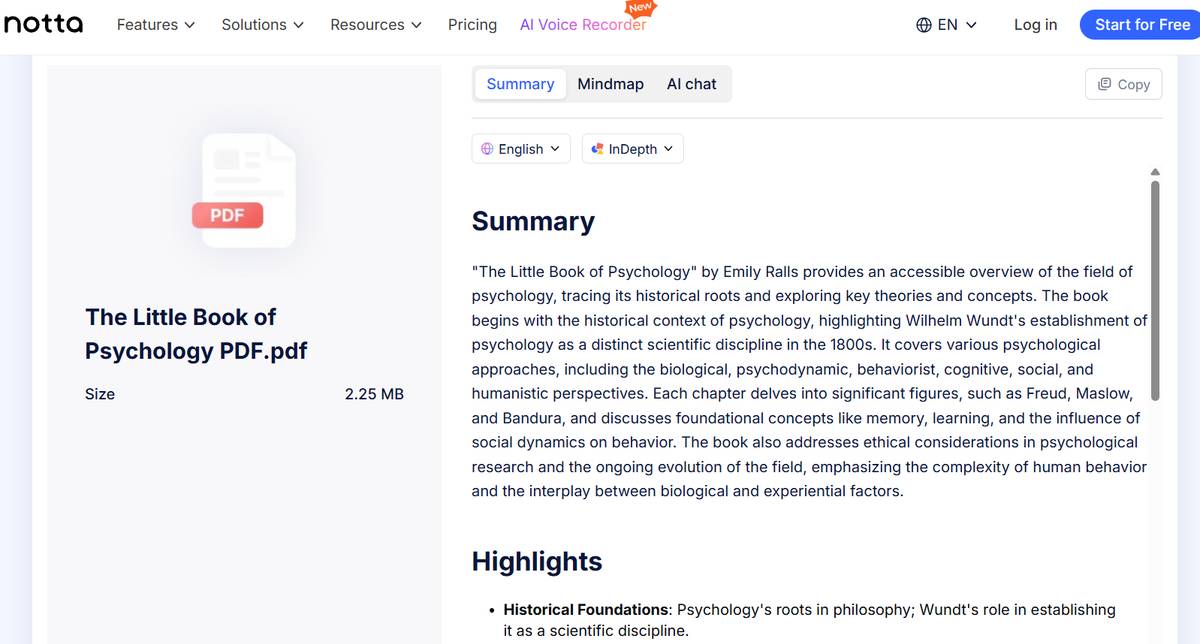
You can copy any section directly from the summary. The results are ready to paste into your study guide, organize in your favorite app, or review before an exam.
Are AI Textbook Note Takers Accurate?
AI notetakers can be surprisingly accurate, but they’re not perfect. They can miss context, struggle with technical terms, or misinterpret diagrams and formulas. It’s important to review AI notes, and luckily, that review process helps you learn.
We already know that reviewing lecture material a few times each week can raise long-term recall. In a way, using an AI note taker helps you learn more without feeling like you’re studying.
How Can You Verify and Improve AI-Generated Notes?
Unfortunately, even the best AI can’t pass your exam for you (yet). AI is great at taking notes, but it’s your responsibility to make that information stick. A few simple habits can help you turn AI-generated notes into useful study tools.
Compare with your textbook: Read through the chapter and make sure the AI included key terms, examples, and definitions.
Add context in your own words: Rewrite complex parts in simple terms. Research shows that paraphrasing helps students remember about 20% more than copying word-for-word.
Highlight and organize: Use headings or color codes to mark important ideas and separate them from filler.
Cross-check with class materials: Match your AI notes with lecture slides, handouts, or recordings to fill in gaps.
Use the full Notta app: In addition to the PDF Summarizer, Notta can transcribe lectures in real time, upload and summarize recordings, and even turn YouTube videos into notes. It’s a comprehensive study tool that keeps everything organized and easy to review.
Review regularly: Spend a few minutes each day revisiting your notes to store the information long-term.
What Are the Limitations of AI Textbook Note Takers?
Charts, complex topics, and low-quality scans can confuse AI note takers. Knowing their limits helps you spot errors before they mess up your study session.
They struggle with visuals and equations. Complex formulas, graphs, and diagrams don’t always translate well to text. Handwritten math or color-coded visuals often lose accuracy or structure during transcription.
Some subjects lose their depth. AI tends to flatten complex ideas in areas like philosophy, history, or literature. The subtle arguments or context behind them often disappear in the summary.
Scanning quality affects accuracy. AI tools need high-resolution scans (at least 300 DPI). Shadows, handwriting, or unusual fonts can confuse OCR tools and distort key details.
AI isn’t great at prioritizing. It summarizes everything evenly, even when some points clearly matter more than others. Skim the summary and highlight the parts that match your syllabus or exam topics
They can’t replace critical thinking. AI textbook notetakers can capture the facts, but they can’t explain why they matter. You still need to interpret, question, and connect ideas on your own.
Frequently Asked Questions (FAQs)
Can AI take notes from a physical textbook?
AI can take notes from physical textbooks after digitization. Scan or photograph textbook pages using apps like Adobe Scan or Microsoft Lens, then upload the PDF to AI note-taking software. OCR technology converts the images to readable text, which enables the AI to extract key concepts, definitions, and examples into organized study notes.
What is the best AI for taking textbook notes?
The best AI for taking textbook notes is Notta. You can upload a digital copy of your textbook directly into Notta’s PDF Summarizer tool, and it automatically analyzes the text, identifies important details, and creates a clear, concise summary or mind map.
Can ChatGPT make notes from a textbook?
Yes, ChatGPT can summarize and organize textbook material if you provide the text or a digital version. It can outline chapters, extract key points, and even simplify complex concepts, but it doesn’t read directly from printed pages or images.

