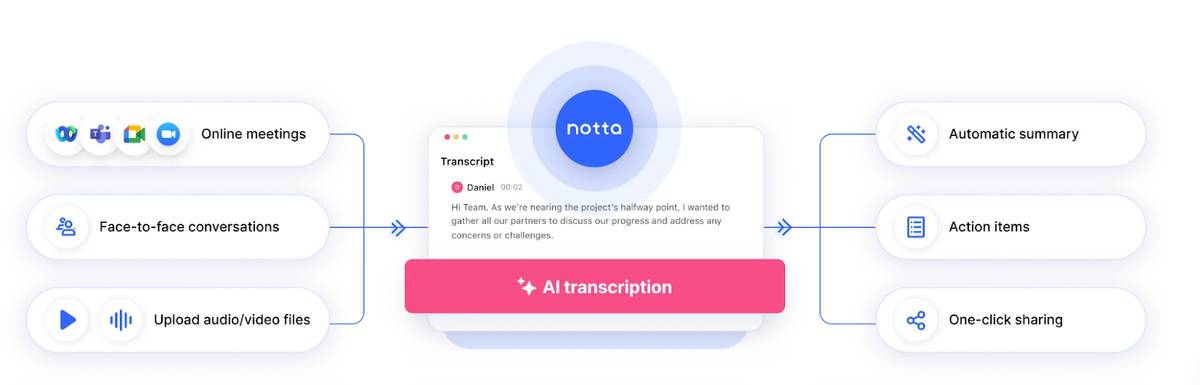
Notta AI Listens and Takes Notes: Never Miss Another Detail!
Saving time and effort with Notta, starting from today!
I’ve been working remotely for years. Before that, I sat through countless online lectures and courses. With hundreds of hours of important information and my less-than-perfect organizational skills, I missed more key details than I’d like to admit.
That all changed when I started using Notta. It's an AI that listens and takes notes for me, transforming meetings and lectures into transcripts and organized notes that are actually useful.
In this article, I’ll show you the real benefits of AI note-taking apps, how Notta saves you time and stress, and the simple steps to start using it.
What Are the Benefits of AI Note-taking Apps?
If you’ve ever walked out of a meeting with messy, half-finished notes, you know how frustrating it can be. It’s just too much to do at once: listen, speak, think, and write everything down? No thanks.
AI note-taking apps lighten your workload by doing the writing for you. Here’s why more people are relying on them:
1. Stay Focused During Conversations
Let an AI note taker handle the note-taking process while you focus on the discussion. Instead of splitting your attention between your meeting and your notes, you stay fully engaged and still walk away with complete meeting notes.
2. Work More Efficiently
An AI listening note taker captures everything, so you don’t waste time on slow manual note-taking or rewatching past meetings. You can quickly scan your transcript later to review the most relevant points without replaying hours of audio.
3. Get Reliable Transcripts
When an AI listens and takes notes, nothing slips through the cracks. Even in fast or complex conversations, you get a word-for-word record you can rely on.
4. Keep Notes Organized and Searchable
AI note-taker tools create notes that are neatly organized and easy to search. You and your team can find key information in seconds, so everyone stays on the same page without digging through clutter.
5. Create Quick Summaries
Turn long conversations into key takeaways with an AI-powered meeting summary. You don’t have to browse through entire transcripts to find important details, since AI does that for you.
6. Save Time on Every Task
An AI notetaker saves you from typing, editing, and chasing details. It generates meeting summaries, lecture notes, and follow-ups automatically, so you can spend your time on real work.
How Do I Save Time with Notta's AI Note-taker?
Plenty of platforms use AI to listen and take notes for you, but Notta takes it a step further. It works for both online and in-person conversations, records meetings in real time, and creates custom notes you can actually use.
Instead of staring at your keyboard, you’re free to watch expressions, listen to subtle nuances, and stay engaged in your meeting. In comparison, all the hours you save are just a bonus.
Here are some of Notta’s key features that make it stand out from other AI note-taking tools:
1. Real-Time Transcription
Notta transcribes conversations as they happen, saving you significant time and giving you instant access to notes right after a meeting or lecture. Real-time transcription is especially helpful for long meetings, where focus tends to fade and details get lost. Notta keeps track of every point, so you don’t have to rely on memory hours later.
2. Transcribe Audio and Video in Minutes
Get transcripts in record time when you upload audio or video files to Notta. You can also paste a YouTube or other video link, and a transcript will be ready in minutes. Both options cut out extra steps and make working with online content much faster.
3. Customizable Summaries with Ready-Made Templates
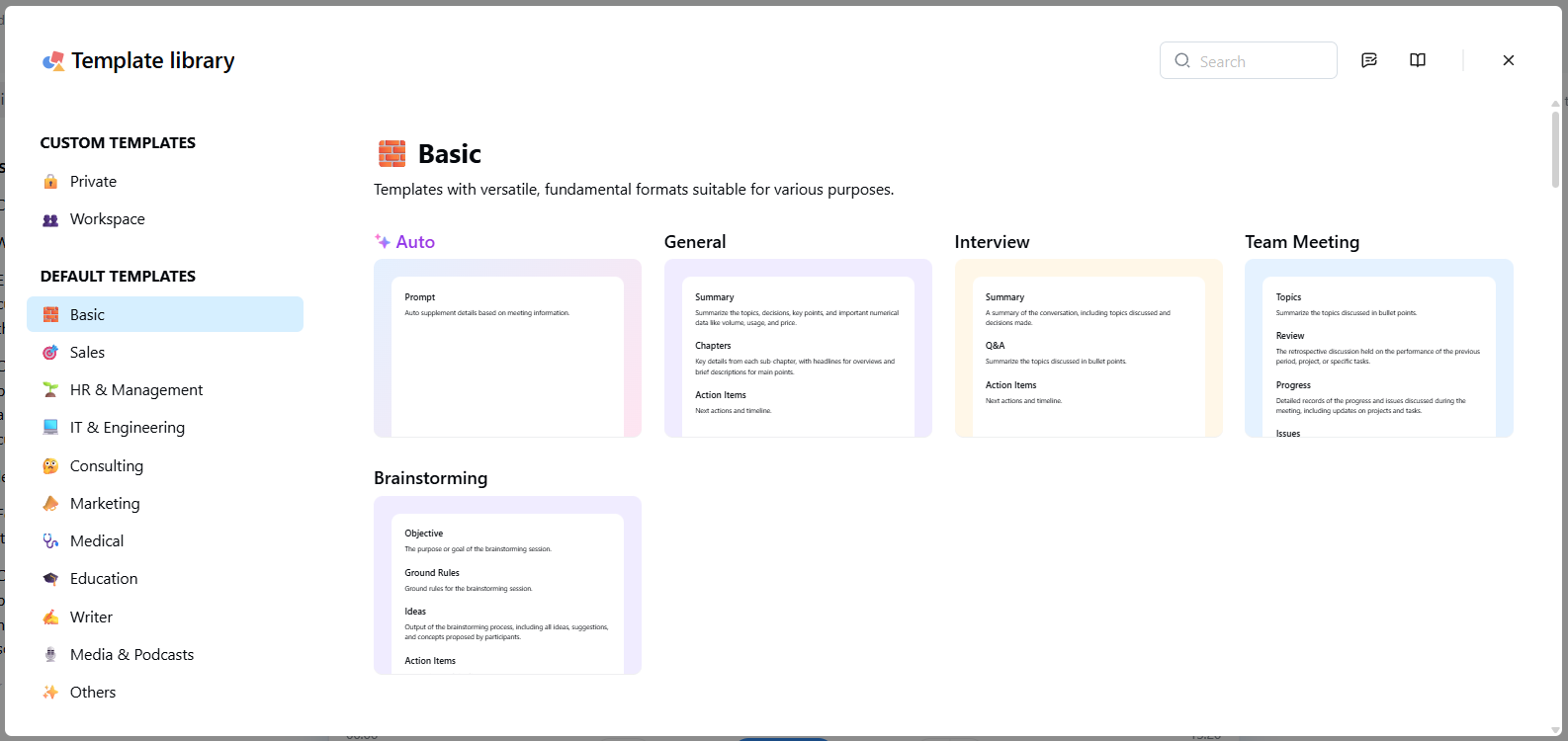
You don’t have to reformat or rewrite your notes with Notta’s preset summary templates. The AI notes tool automatically generates the right type of summary, and you can use frequent AI prompts to refine it. You save hours of tedious editing, whether you need a quick recap of key points or a detailed report.
4. Access Anywhere with Mobile Apps and Chrome Extension
Notta saves you the trouble of switching devices or logging into multiple platforms, with apps available for iOS, Android, and a Chrome extension. You can record, upload, and review transcripts anywhere, anytime.
5. Bot-Free Transcription When You Need It
Notta lets you record and transcribe right from the app or extension instead of relying on bots or calendar invites. It’s a more secure approach that works just as well for virtual and in-person meetings without any extra steps.
6. Auto-Joins Scheduled Meetings
You can connect Notta to your Google or Outlook calendar, and the Notta Bot will automatically join and transcribe meetings for you. It even attends meetings when you can’t, so you still get a transcript and summary!

How Do I Use Notta's AI That Listens and Takes Notes?
Great note-taking starts with accurate transcriptions, and Notta makes the whole process effortless. From lectures and meetings to brainstorming sessions, it transcribes and turns them into clean, organized summaries in minutes. Here’s how to do it in three simple steps.
Step 1: Upload your file
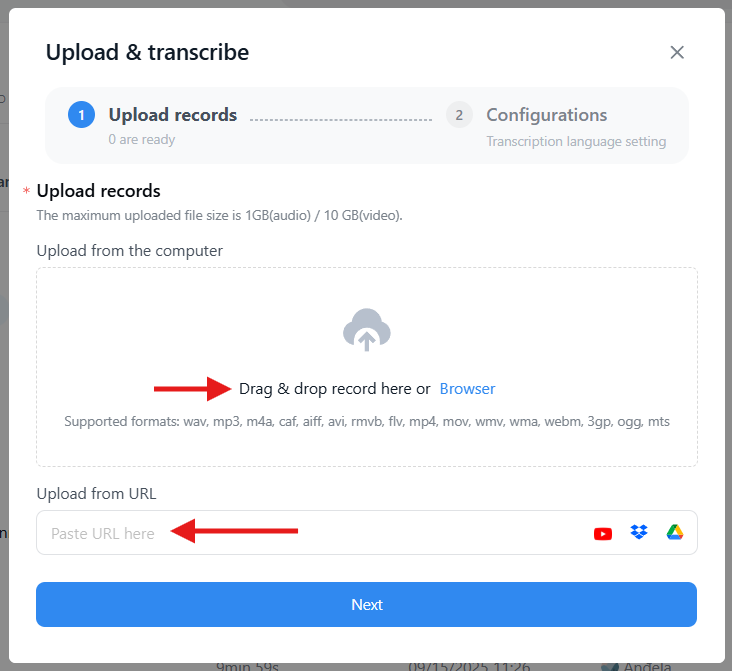
Drag and drop any audio, video, or YouTube link. Notta supports common formats like WAV, MP3, MP4, and WMV, and even simple voice memos from your phone, so you don’t need to convert files first.
Step 2: Let Notta do the listening
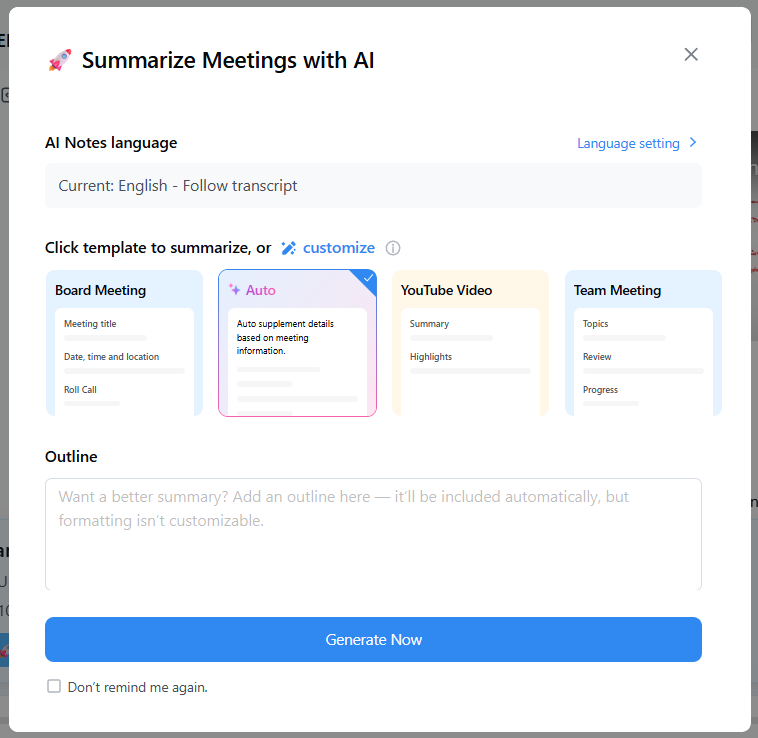
The AI tool transcribes your content automatically with 98.86% accuracy in up to 58 languages and gives you a full transcript in just minutes. Open the summary screen and select a preset template or customize the outline before generating your notes.
Bonus: Notta also supports bilingual transcription in 23 different languages.
Step 3: Get instant summaries and highlights
You’ll have a finished transcript highlighting key points and main ideas. You can edit the transcript and notes directly in the platform.
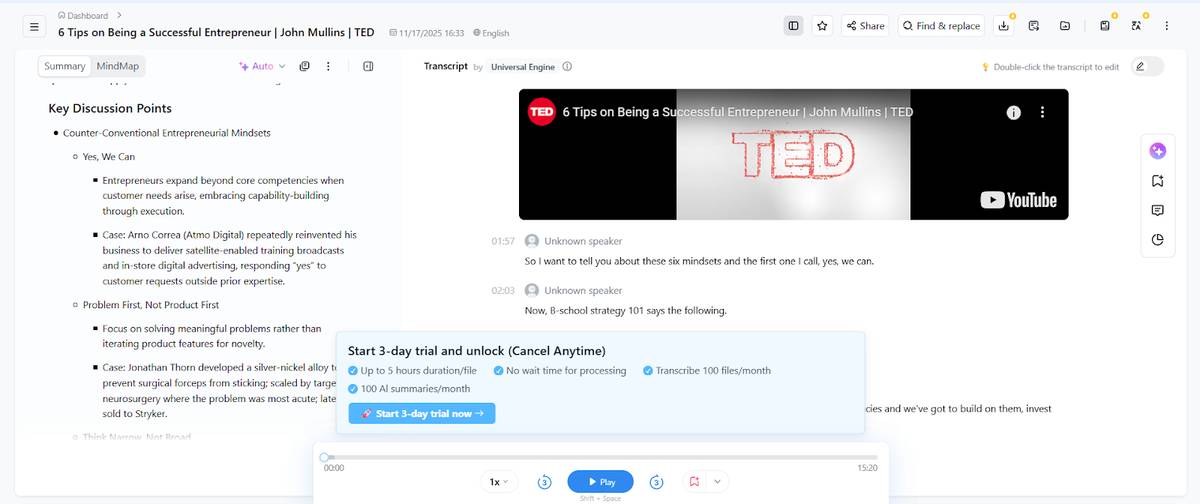
Share the post meeting summaries directly with your entire team, or export them to Google Docs or Slack.
Notta’s smooth CRM integration also makes it easy to sync transcripts and notes into tools like Salesforce or HubSpot.
In just a few clicks, your recordings turn into organized, searchable notes that make studying and reviewing effortless.
Why Use Notta for Audio Transcription?
Accuracy and speed are crucial when it comes to audio transcription. Notta delivers both, along with advanced features that turn raw transcripts into actionable insights for professionals, students, and teams.
Here’s why Notta is the best tool for automatic transcription:
1. Excellent Accuracy
Accuracy is where Notta stands out. It generates transcripts in 58 different languages with up to 98.86% accuracy, so you can skip tedious editing and reformatting. It also works well in noisy environments and with overlapping dialogue, while speaker identification keeps your transcripts clear and organized.
2. High-Speed Transcription
Notta transcribes a one-hour audio file in just five minutes giving you near-instant access to your notes. This fast turnaround saves countless hours per file compared to manual transcription. It also offers real-time transcription in multiple languages for live sessions, so you can follow every conversation as it happens.
3. Easy to Use on Any Device
Notta is quick to set up and ready to use right away. It works on desktop, mobile, and through a Chrome extension, so you always have access where you need it. Uploading is as simple as dragging and dropping files, or you can record new audio with one click.
The interface is clean and intuitive, so transcripts and features are easy to find without digging through menus. With Notta’s bot joining meetings automatically, you record and transcribe every conversation without lifting a finger.
4. Made for Businesses, Professionals, and Students
Notta makes life easier for anyone who needs better notes.
Professionals can record client calls or virtual meetings and instantly generate concise summaries with clear follow-up tasks. Businesses can rely on the Notta Bot to auto-join scheduled meetings and keep everything documented. Students can record lectures and review them later as searchable transcripts - no more messy notetaking!
With multilingual support and customizable summary templates, Notta adapts to quick briefings, detailed minutes, or study highlights.
5. Built-in Recording for Meetings
Notta makes it simple to record meetings by capturing both audio and video directly. The platform transcribes each recording automatically, with the option to choose monolingual or bilingual transcription depending on your needs.
You can also enable real-time translation to follow conversations across different languages. With everything recorded, transcribed, and synced in one place, it’s easy to replay, review, and share your meetings without relying on separate tools.
FAQs
Can AI take notes from audio?
Yes, AI can take notes from audio using speech recognition technology. Notta uses artificial intelligence to transcribe audio in minutes, then generates automated summaries with key points and action items to make sure you don't miss anything.
Is there an AI that takes notes for you?
Yes, Notta is an AI that takes notes for you. You can transcribe live meetings or upload files from past meetings, and Notta will transcribe everything and create searchable notes.
Which AI tools can take meeting notes?
Several AI tools can take meeting notes, but Notta is the best choice for most people. You can record live conversations, upload audio or video files, or let the Notta bot auto-join your online meetings. No matter how you work, Notta adapts and delivers accurate transcripts and actionable summaries.
Can ChatGPT take notes from audio?
No, ChatGPT can’t take notes from audio directly. However, you can use tools like Notta to transcribe audio from meetings, interviews, or lectures, then use ChatGPT to summarize the transcript into notes with key insights.
Is there an AI that listens and takes notes for free?
Yes, there’s an AI that listens and takes notes for free. Notta offers a generous free plan that includes 120 transcription minutes, 50 file uploads, and 10 AI summaries per month. You can try it for free today!

