

Bilingual Transcription Workflow for Agencies and Client Teams

Use bilingual transcription to capture both languages in a client call without taking two sets of notes. Your agency gets one transcript to revisit and share, while optional translation helps you read the other language. With Notta, you can then turn that conversation into a team brief or client follow-up instead of writing from memory.
What does bilingual transcription help agencies do?
Bilingual transcription helps you stay involved in the client conversation while keeping a record of both spoken languages. It is especially useful when an agency and its client switch languages during discovery calls, campaign discussions, or project updates.
Notta’s bilingual transcription captures both languages in the same recording. For your agency, that means:
- More attention for the client. Let Notta transcribe while you ask questions and discuss ideas, rather than trying to write everything down.
- One place to find the conversation. Return to the English and Japanese parts of a call without piecing together separate notes.
- An easier handoff to your team. Colleagues can use the transcript, translated text, or a concise recap instead of relying on the account lead to retell the meeting.
The distinction is simple: transcription records what people say in each language; translation makes that text readable in another language. Choose bilingual transcription when two languages are spoken, and add translation when you need it.
How can agencies use Notta for bilingual client meetings?
Choose the two spoken languages, record the conversation, and use the result for the follow-up your team needs. This workflow connects bilingual transcription for agencies to everyday client work.
1. Choose the languages and the follow-up you need
Decide which two languages people will speak and what you want to take away from the call. A discovery meeting may need a team brief. A campaign catch-up may need a short client email and a list of next actions.
Agree with the client on recording and sharing, following applicable consent laws and both teams’ policies. Then you can focus on the discussion with a clear purpose for the notes.
2. Select both spoken languages in Notta
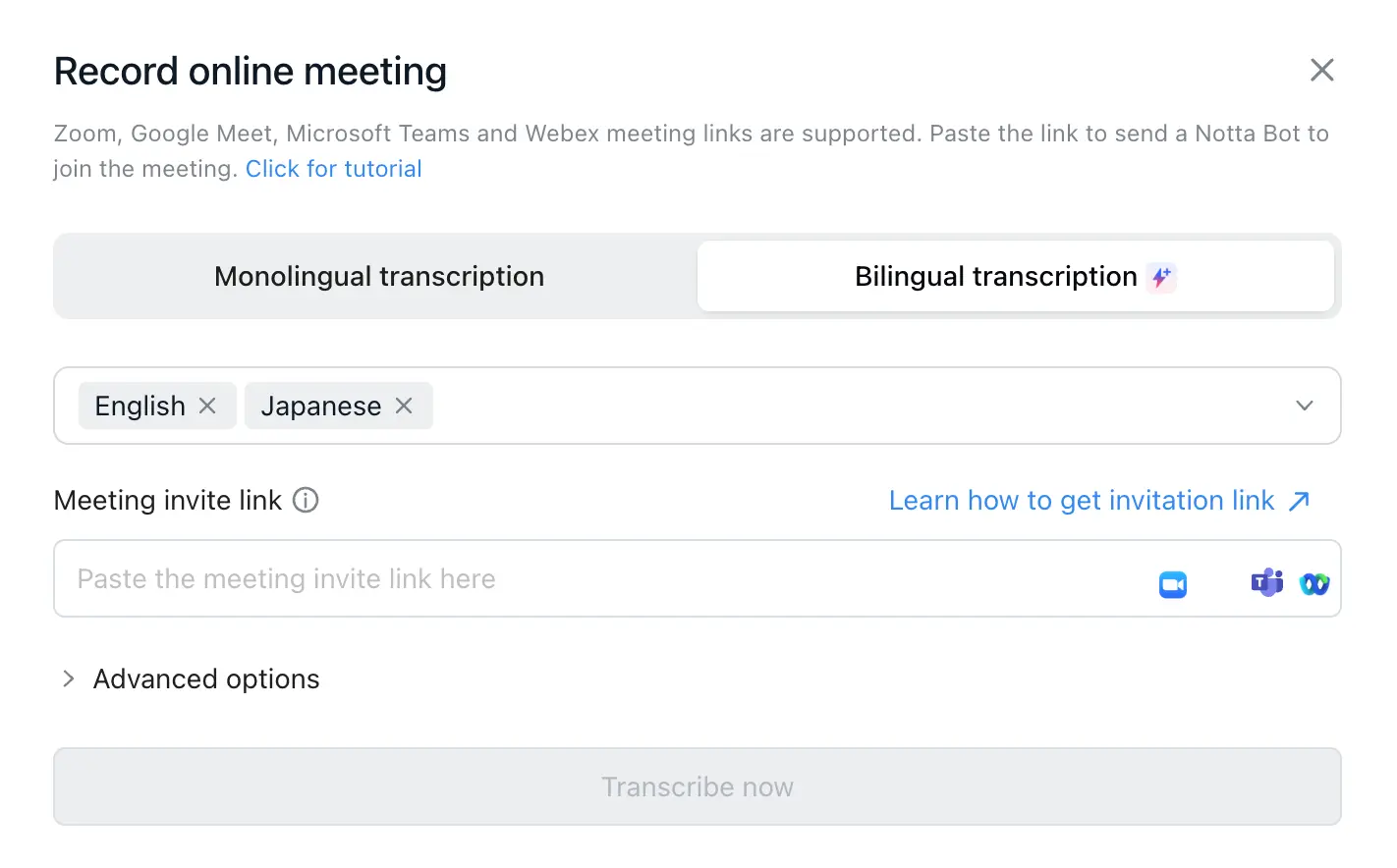
For an online client call, open Record online meeting in Notta on the web. Choose Bilingual transcription, select the two languages people will speak, and enter the meeting link so the bot can join. Check that the bot has been admitted and recording has started.
Select the languages people will speak, not the language you want the final recap written in. Notta supports two-language transcription from 23 language options. The bilingual recording guide explains the setup.
Choose a plan and bilingual allowance that cover the length and frequency of your client calls. Free recordings are limited to three minutes, so they are not suitable for capturing a full client meeting.
3. Follow the conversation instead of writing everything down
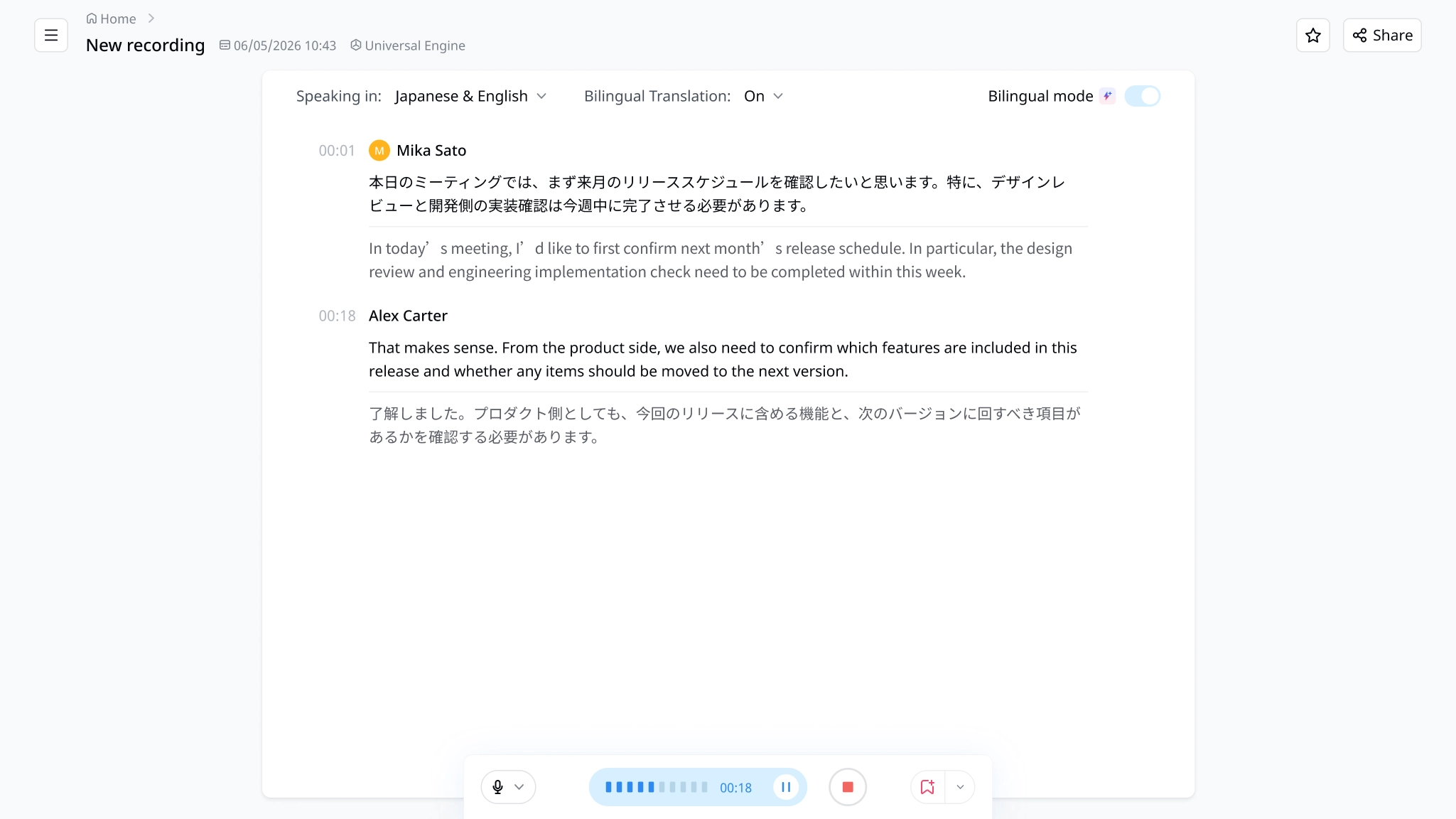
Once recording starts, let Notta handle the transcript while you focus on the client. You can spend your attention on a follow-up question or a new idea rather than keeping up with every sentence.
If you need help reading the other language, turn on Bilingual Translation to see translated text during the call. For example, an English-speaking account lead can read the translation while a client explains feedback in Japanese.
4. Find what your team needs without replaying the whole call
Use the transcript as a reference when a colleague asks about a topic from the meeting. Search for the campaign, product, or page discussed instead of listening through the entire recording.
For a broader question, use Notta Brain, the AI capability built into Notta, to ask about the selected meeting. For example: “What changes did the client request for the homepage?” You get a focused starting point for the handoff instead of assembling it from memory.
5. Turn the conversation into a useful follow-up
Ask Notta to draft the output you chose at the start: a client email, a creative brief, or a list of actions. Specify who it is for and how much detail they need.
For example: “Use this meeting to draft a short client follow-up with the main decisions, next actions, and open questions.” Your team starts with a draft based on the conversation rather than a blank page.
Give the draft a quick check before sending, focusing on anything that changes the work. Clarify unclear points with the client; an AI draft is not client approval.
Example: turn a bilingual campaign call into a team brief
A two-language transcript gives your agency a shared starting point for the brief, follow-up, and next meeting.
Imagine a fictional English-Japanese campaign call. The agency discusses landing-page ideas in English, while the client explains audience preferences and creative feedback in Japanese.
| What the team needs | How to use the meeting record | What you get |
|---|---|---|
| Direction for the creative team | Ask Notta to bring together the audience goals and requested changes. | A brief draft without manually combining two sets of notes. |
| A client follow-up | Ask for a short recap of the discussion and next actions. | An email draft you can adapt and send. |
| Context for a colleague who missed the call | Share the relevant transcript or recap with permitted recipients. | A reference they can use without another handoff meeting. |
The account lead no longer has to act as the only bridge between the call and the delivery team. Both languages contribute to the same meeting record, which the agency can reuse for different tasks.
How can IT, marketing, and SEO agencies use the results?
Use the bilingual meeting record to create the handoff your team needs, whether that is a development brief, creative direction, or an SEO update.
IT agencies: give developers the client context
Use the discussion to draft a requirements recap with the client’s goals, requested features, and open technical questions. Developers get the reasoning behind a request, not just a task passed along by the account manager.
For example, a client’s explanation of how staff use a system can sit alongside the agency’s proposed changes, even when those parts use different languages.
Digital marketing agencies: turn feedback into creative direction
Bring the client’s audience insights, tone preferences, and campaign ideas into one brief draft. Designers and writers can start from the discussion without asking the account lead to reconstruct every comment.
I would use this as the starting point for creative work, rather than treating translated comments as finished advertising copy.
SEO agencies: connect client priorities to the next update
Use the meeting record to gather the markets, pages, and content topics the client wants to prioritize. Combine the selected call with the relevant performance report in Notta to draft a project update.
Keep original search queries and URLs alongside any translated explanation so the team can connect the discussion to the actual pages and search data.
How does Notta help beyond the bilingual transcript?
Notta helps your agency record conversations, understand the discussion, and create the work that follows. The bilingual transcript is one part of that process.
Record in a way that fits the call. Alongside meeting-bot recording, Notta Desktop offers bot-free recording when you want to record without adding a bot to the participant list. Get the necessary consent whichever option you choose. Standard bot-free recording encrypts and sends audio to Notta for transcription; it is not an offline workflow.
Build the document or deck the project needs. Through Notta Brain, Notta can turn selected meetings and files into Word documents, PowerPoint presentations, and visuals. Use a campaign discussion to start a client presentation, or combine a call with project files to draft a report. You have material to shape instead of creating the structure from scratch.
Pick up where the last call ended. Compare selected calls and project files to find how the client’s priorities have changed. This gives you context for the next discussion without rereading each meeting separately. For a fuller example, see how to turn meeting transcripts into agency deliverables.
Spend more of the call with your client and less of the follow-up rebuilding notes. Start with Notta to capture both languages and turn the conversation into work your team can use.
Frequently asked questions
Can one transcript include two spoken languages?
Yes. Notta’s bilingual transcription lets you select two supported languages and transcribe both in the same recording. This is useful when agency and client teams switch languages during a call. Optional bilingual translation adds translated text in supported live workflows, rather than changing which languages people can speak.
Is bilingual transcription the same as live interpretation?
No. Bilingual transcription records speech as text in two languages. Live interpretation usually means helping people understand spoken conversation as it happens. Notta’s bilingual workflow can provide translated text, but that should not be described as a spoken interpreter. Arrange additional language support when participants need it.
What if a client meeting uses more than two languages?
Notta’s bilingual transcription is designed for two selected spoken languages, not unrestricted multilingual conversation. Agree on the main pair before the meeting. If a third language will be important, plan suitable language support rather than assuming the same setting will capture every contribution correctly.
Can I use bilingual transcription for an existing client recording?
Yes. You can upload an audio or video recording and select two spoken languages for bilingual transcription. This lets you use an existing client call without transcribing it yourself. Get permission to upload the recording. The uploaded-file workflow does not include the live bilingual translation option.
