
Best Botless Meeting Recorders in 2026: No-Bot Alternatives to Otter, Fireflies & Fathom
Saving time and effort with Notta, starting from today!
The best AI notetaker without a bot is the one that records locally, works on all of your meeting platforms, and gives you useful AI meeting notes after the call. For most business professionals and teams, Notta Desktop is the strongest all-around pick because it records without a visible meeting bot, supports Mac and Windows, and connects recordings to Notta Brain, Notta’s AI Meeting Execution Engine for slides, reports, summaries, and action items.
If you need free transcription, Otter Desktop is easier to start with. If your team already runs on Fireflies, Fireflies Desktop adds deep integrations and Live Assist. If you require screenshots and text notes during the call, Plaud Desktop is worth a look. If your team uses Google Meet, Fathom can work well, but its botless setup is not universal across other platforms, including Zoom and Teams.
Disclaimer: Notta makes one of the products reviewed in this guide. We've included competing tools because the right choice depends on your workflow, budget, and the platforms you use. Any affiliate links are labeled as such. Pricing and features change frequently – check each vendor's site before purchasing.
Best Botless Meeting Recorders in 2026: At A Glance
| Tool | Best for | Botless coverage | Starting price | Main trade-off |
|---|---|---|---|---|
| Notta Desktop | Best all-around botless recorder for meeting notes and post-meeting deliverables | Fully botless across supported desktop apps | Free plan; Pro from $8.17/mo billed annually | Public beta, so expect ongoing stability updates |
| Otter Desktop | Simple free botless recording | Fully botless across Zoom, Google Meet, and Teams | Free plan; Pro from $8.33/mo billed annually | Limited language support and fewer post-meeting outputs |
| Fireflies Desktop | Teams that need integrations and in-meeting AI help | Fully botless for desktop audio capture | Pro from $10/mo billed annually | Desktop recording is not available on the free plan |
| Plaud Desktop | Multimodal capture with screenshots, notes, and audio | Fully botless desktop recording | Paid Plaud AI membership from $99.99/yr | Best value if you already use Plaud hardware or workflows |
| Fathom Desktop | Google Meet-heavy teams that want a free option | Botless on Google Meet only | Free plan; Premium from $15/mo | Uses a visible participant on Zoom and Teams |
How We Chose and Tested These Tools
We shortlisted tools that give users a realistic way to record meetings without adding a visible bot to the participant list, including the alternatives most often weighed against Otter, Fireflies, and Fathom.
For this list, we focused on five tools with either active desktop or no-bot recording options in 2026. We evaluated each one on recording method, transcription quality, supported platforms, and pricing..
For desktop tools, we tested the full workflow on Zoom, Google Meet, and Microsoft Teams – from install and join, to checking for a visible participant, recording system and mic audio, and reviewing the transcript, summary, and export.
Our scoring weighted five criteria:
Botless reliability and meeting-platform coverage: 30%
Desktop app availability on Mac and Windows: 20%
AI output quality after the meeting: 20%
Pricing and free-plan usefulness: 15%
Privacy, security, and admin fit for business use: 15%
We also looked for meaningful trade-offs, not just feature counts. A free tool can be the best pick for a solo user, while a paid tool can be the better pick for a consultant, sales team, or global company that needs multilingual transcription, real-time translation, and client-ready outputs.
Why Desktop Recording Beats Bots
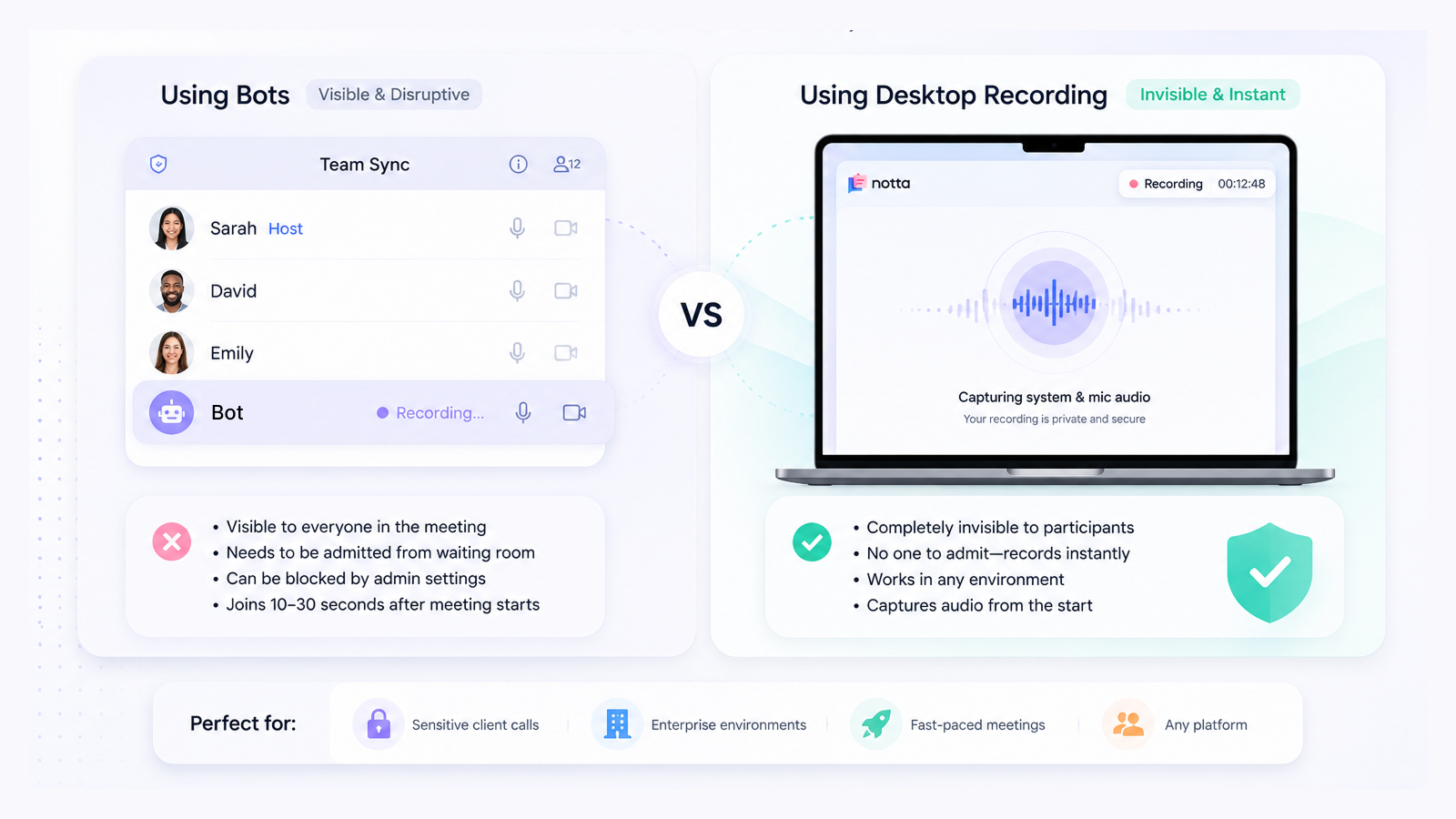
Most AI notetakers work by sending a bot into your meeting as a visible participant, which means that everyone in the call sees a "[Tool Name] is recording this meeting" notification. It works, but it creates friction that desktop recording avoids.
Here's when a bot becomes a real problem:
Sensitive client calls: the bot is a visible intrusion that signals surveillance.
Waiting rooms: if the host doesn't admit the bot in time, your recording never starts.
Blocked platforms:some enterprise environments block bots at the admin level entirely.
Speed: bots take 10–30 seconds to join after a meeting starts; a desktop app records instantly
Desktop apps solve all these problems in an instant by capturing audio locally directly from your machine. There's nothing to admit, nothing to block, and nothing visible in the participant list.
Side-by-Side Comparison
| Feature | Notta Desktop | Otter Desktop | Fireflies Desktop | Plaud Desktop | Fathom Desktop |
|---|---|---|---|---|---|
| Available now | ✅ Beta | ✅ | ✅ (Pro+ only) | ✅ Beta | ✅ |
| Fully botless (all platforms) | ✅ | ✅ | ✅ | ✅ | ⚠️ Google Meet only |
| macOS | ✅ | ✅ | ✅ | ✅ | ✅ |
| Windows | ✅ | ✅ | ✅ | ✅ | ✅ |
| Languages | 58+ | 4 | 100+ | 112 | 38 |
| Bilingual transcription | ✅ | ❌ | ❌ | ❌ | ❌ |
| Real-time translation | ✅ | ❌ | ❌ | ❌ | ❌ |
| In-meeting Live Assist | ❌ | ❌ | ✅ | ❌ | ❌ |
| AI output (slides, reports) | ✅ Notta Brain | ❌ | ❌ | ❌ | ❌ |
| In-meeting screenshot capture | ❌ | ❌ | ❌ | ✅ | ❌ |
| Captures non-meeting audio | ✅ | ✅ | ✅ | ✅ | ❌ |
| Hardware companion | ✅ Notta Memo | ❌ | ❌ | ✅ Plaud devices | ❌ |
| Free plan includes desktop | ✅ 120 min/mo | ✅ 300 min/mo | ❌ (Pro+ required) | ❌ | ✅ Unlimited |
| Pro plan price(billed annually) | $8.17/mo | $8.33/mo | $10/mo | $8.33/mo | $15/mo |
| SOC2 Type II | ✅ | ✅ | ✅ | ✅ | ✅ |
| HIPAA | ✅ | ✅ | ✅ | ✅ | ✅ |
The 5 Best Desktop AI Notetakers in 2026: The Ranked List
1. Notta Desktop
Best for: Business professionals and teams that want botless meeting transcription, AI meeting notes, and ready-to-use outputs after the call.
Platforms: macOS 13+ / Windows 10+ (Apple Silicon recommended; best on macOS 14.4+)
Notta Desktop is Notta’s bot-free local recording client. It captures system audio and microphone audio from your device, so no visible bot joins the meeting. It is compatible with Zoom, Microsoft Teams, Google Meet, Slack, and other desktop meeting apps, with compatibility across 26+ macOS apps and 17+ Windows apps.
Notta is an AI-powered meeting productivity platform that captures conversations, creates meeting transcription notes and AI summaries, detects action items, and connects recordings to Notta Brain, an AI Meeting Execution Engine.
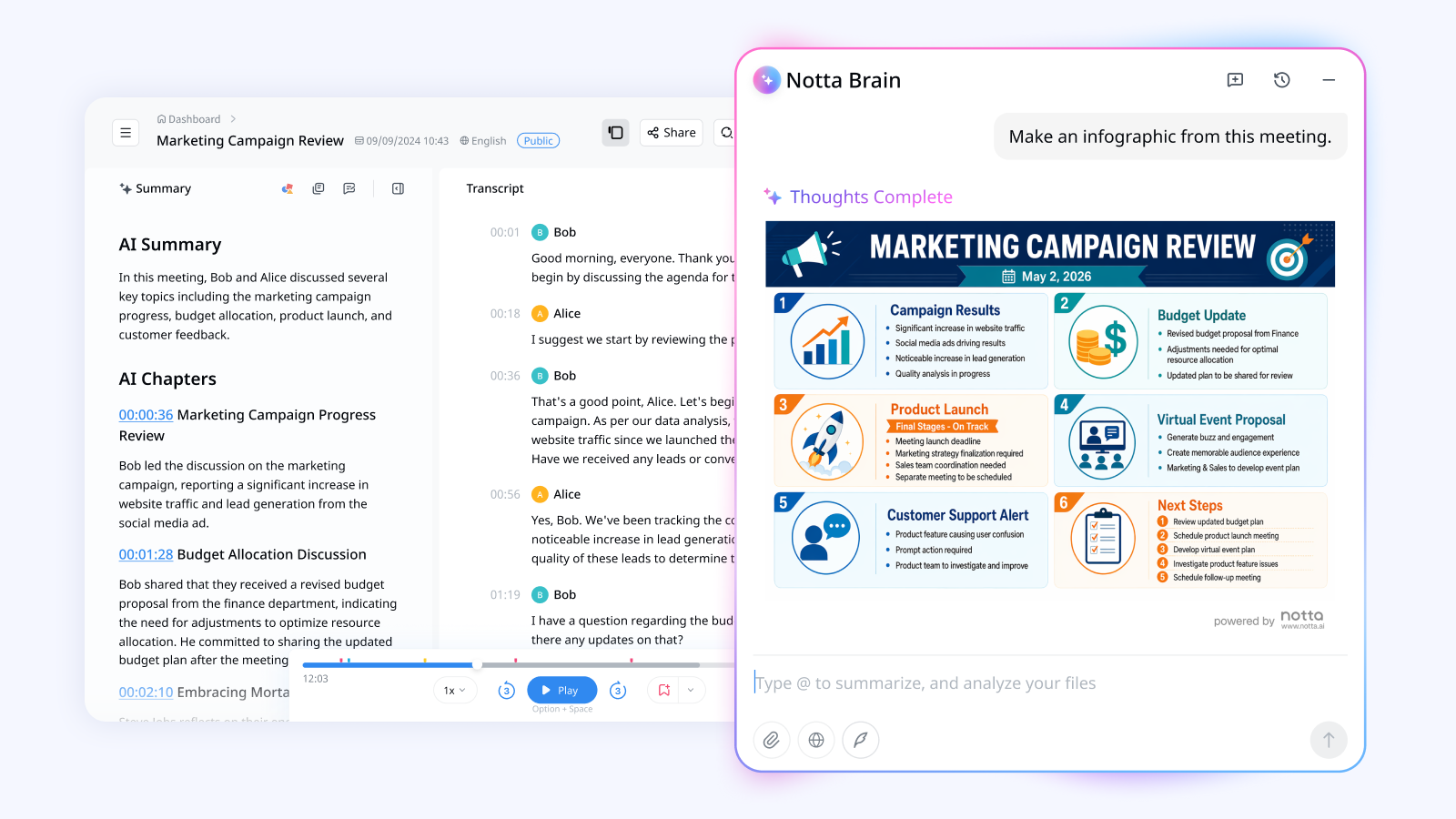
The biggest difference Notta makes is what happens after the recording. Notta Brain can turn meeting content into slides, infographics, reports, email drafts, tables, and task lists. .
What works well:
Fully botless local recording with no waiting-room delay.
Mac and Windows support for teams with mixed devices.
58+ transcription languages, 23 bilingual transcription languages, and 80 real-time translation languages.
Post-meeting infographics, images, and other outputs that go beyond transcripts and summaries.
Specific security coverage includes SOC2 Type II, ISO 27001, GDPR, CCPA, HIPAA, AES-256, and AWS data hosting.
Where it has limits:
Notta Desktop is still in public beta, so teams should test it on their main meeting apps before rolling it out widely.
The US free plan includes 120 transcription minutes per month; users who need 1,800 minutes can upgrade to Pro at $8.17/mo billed annually.
Fireflies has more third-party integrations, so teams with complex CRM and recruiting workflows should compare integration depth before switching.
First-hand review note: In a typical client-call workflow, Notta Desktop is strongest when the meeting is only the start of the work. A consultant can record the call, generate a meeting summary, extract action items, and use Notta Brain to create a client-ready report or slide outline without rebuilding the conversation from scratch.
Pricing: Free plan available for US users with 120 min/mo. Pro starts at $8.17/mo billed annually with 1,800 min/mo. Business starts at $16.67/mo billed annually with unlimited transcription. A 7-day Business trial is available.
2. Otter Desktop
Best for: Solo users who want a simple, free, botless recorder and transcription service for English-heavy meetings.
Platforms: macOS 12.3+ / Windows 10+
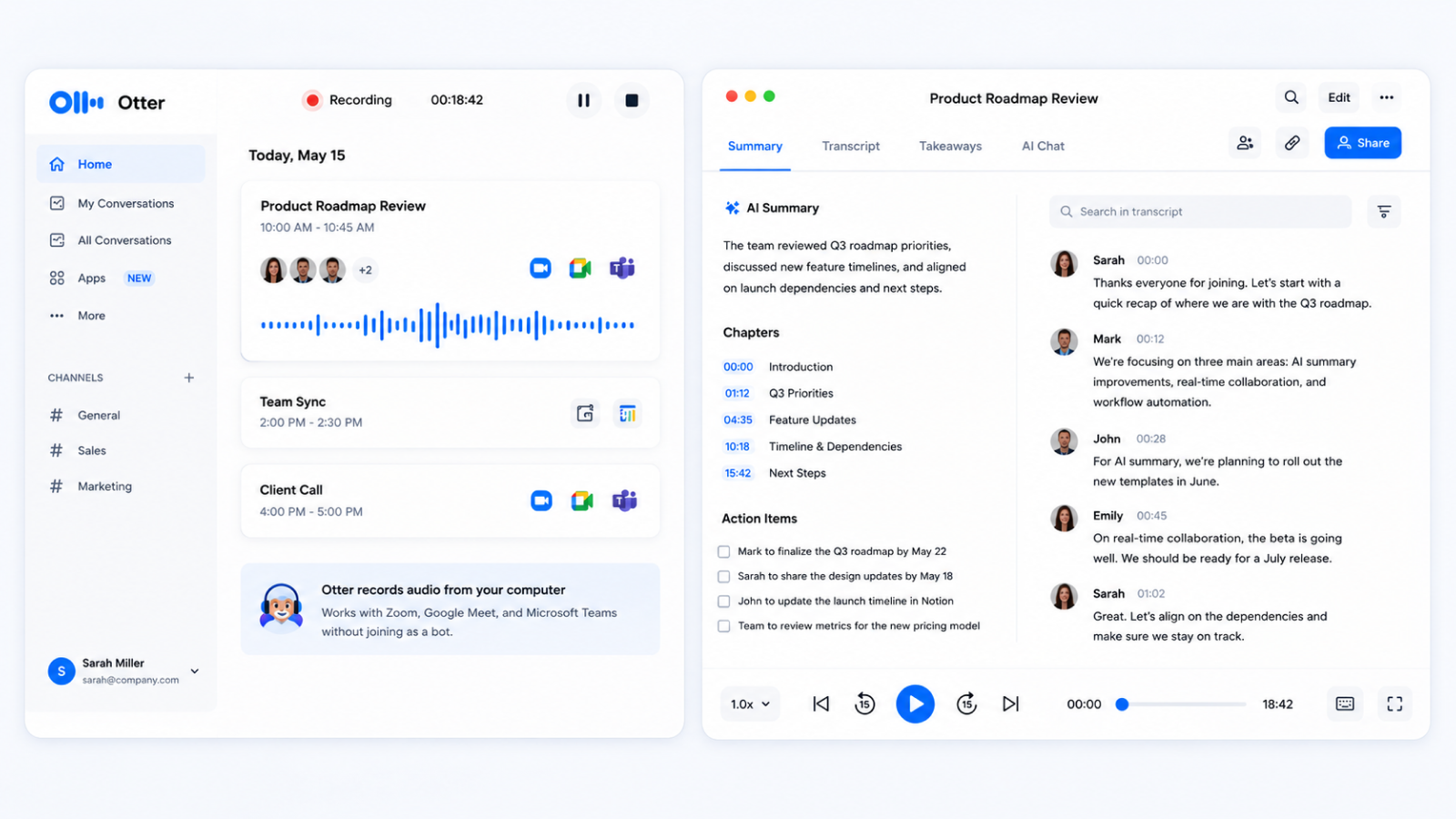
Otter Desktop is the go-to option if you want botless recording without paying first. It records meetings locally from your desktop and works across Zoom, Google Meet, and Teams without adding a visible participant to the call. The setup is simple, and the free plan gives you enough minutes to test the workflow.
What works well:
Botless recording across major meeting platforms.
Simple setup and a clean user experience.
Free plan with 300 transcription minutes per month.
Where it has limits:
Language support is limited to English, French, Spanish, and German.
The free plan has a 30-minute per-session limit.
Post-meeting output focuses on transcripts and summaries, not slides, reports, or more in-depth deliverables.
First-hand review note: Otter Desktop is a good fit when the output you need is a simple, clean transcript and meeting summary.
Pricing: Free plan with 300 min/mo and a 30-minute per-session limit. Pro starts at $8.33/mo billed annually with 1,200 min/mo.
3. Fireflies Desktop
Best for: Teams already using Fireflies that want desktop recording, integrations, and real-time in-meeting help.
Platforms: macOS / Windows
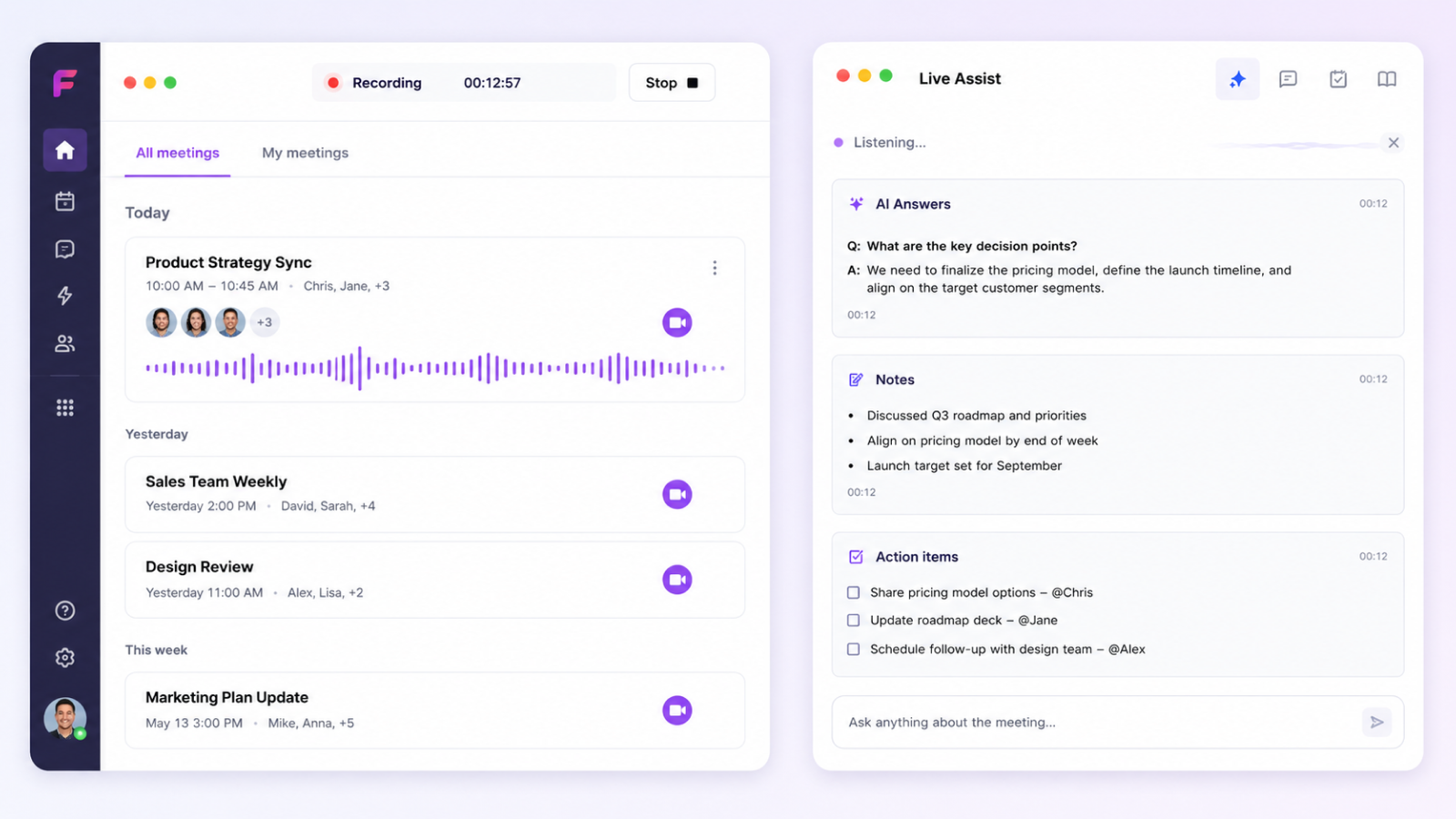
Fireflies Desktop records audio from your computer instead of sending a bot into the meeting. That makes it useful for teams that already rely on Fireflies for meeting summaries, CRM sync, and internal workflows. Its standout feature is Live Assist, a real-time panel that can surface answers, notes, and context while the meeting is still happening.
What works well:
Strong integration ecosystem across CRMs, project management apps, ATS platforms, and collaboration tools.
Live Assist for real-time prompts and context during a meeting.
Desktop recording for any computer audio source, not just scheduled video calls.
SOC2 Type II, GDPR, and HIPAA support.
Where it has limits:
Desktop recording requires a paid plan.
Post-meeting outputs are limited to transcripts and basic summaries – no slides, infographics, or visual reports.
Fireflies does not offer bilingual simultaneous transcription or real-time translation workflows.
First-hand review note: Fireflies Desktop makes the most sense when integrations matter more than the final output format. A sales team that already syncs Fireflies notes into a CRM may prefer staying in that workflow instead of changing tools.
Pricing: Fireflies has a free plan, but Desktop requires Pro, Business, or Enterprise. Pro starts at $10/mo, billed annually.
4. Plaud Desktop
Best for: Users who want to capture screenshots, text notes, and audio in the same meeting workflow.
Platforms: macOS (Intel + Apple Silicon) / Windows 10+
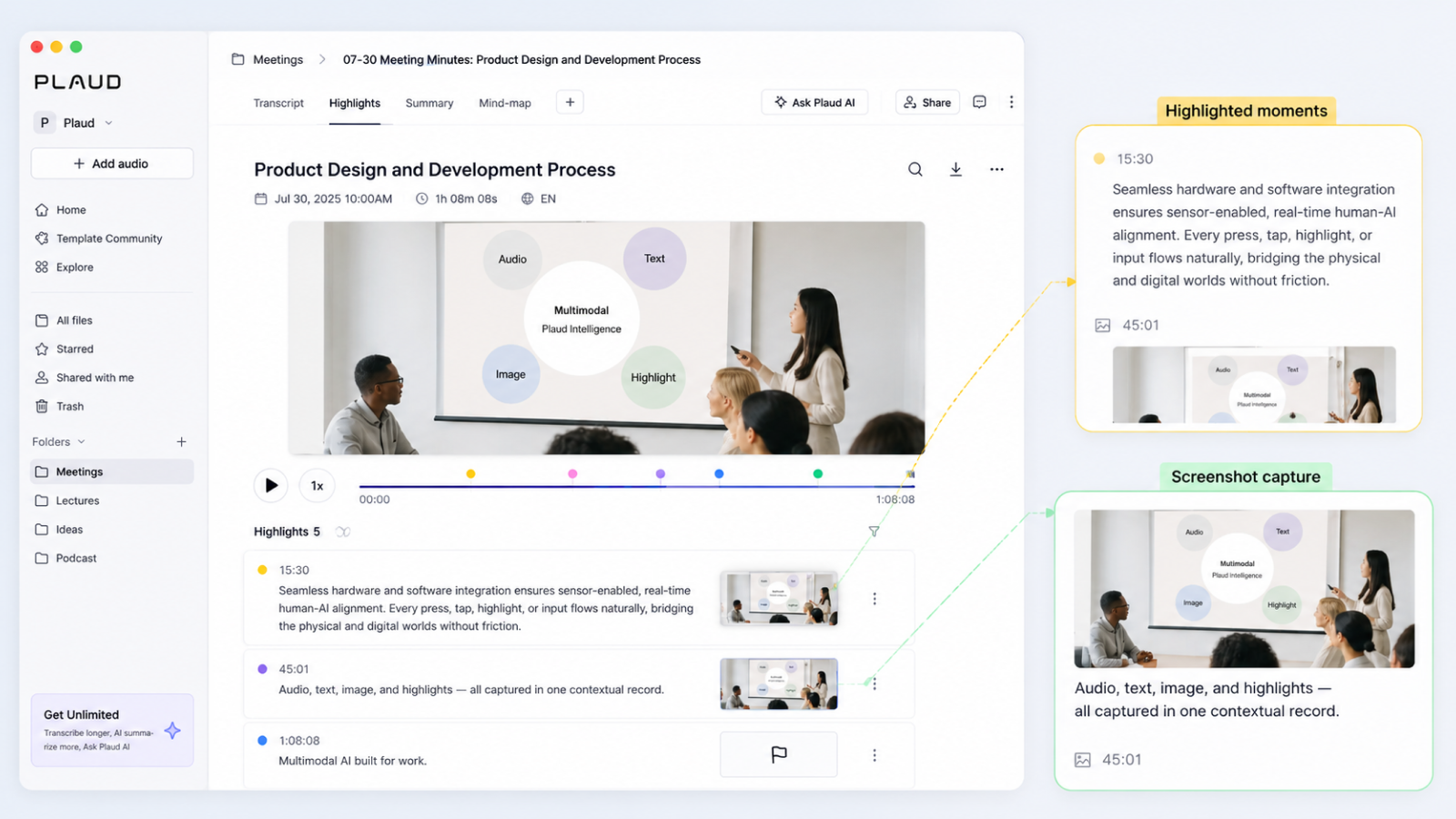
Plaud Desktop records meetings from your computer without a visible bot and brings something new to the table:multimodal capture. During a meeting, you can highlight key moments, add text notes, and capture screenshots of slides or diagrams. Those extra inputs help the AI summary understand more than just the spoken audio.
What works well:
Botless desktop capture across major meeting apps.
Screenshot capture for slides, diagrams, and visual context.
Text notes and real-time highlights that guide the AI summary.
Broad language coverage, with 112 languages listed.
Where it has limits:
AI features require a paid Plaud AI membership.
The workflow is strongest if you already use Plaud’s hardware or note system.
Outputs are limited to single-meeting transcripts and summaries – no slide or report generation, and no synthesis across multiple meetings.
First-hand review note: Plaud Desktop is most useful when the visual context matters. Product demos, design reviews, and training calls often include slides or diagrams that are hard to understand from audio alone.
Pricing: Plaud AI Pro costs $99.99/yr with 1,200 min/mo. Unlimited costs $239.99/yr. There is no free AI plan.
5. Fathom Desktop
Best for: Google Meet-heavy teams who want a free, lightweight note taker.
Platforms: macOS / Windows
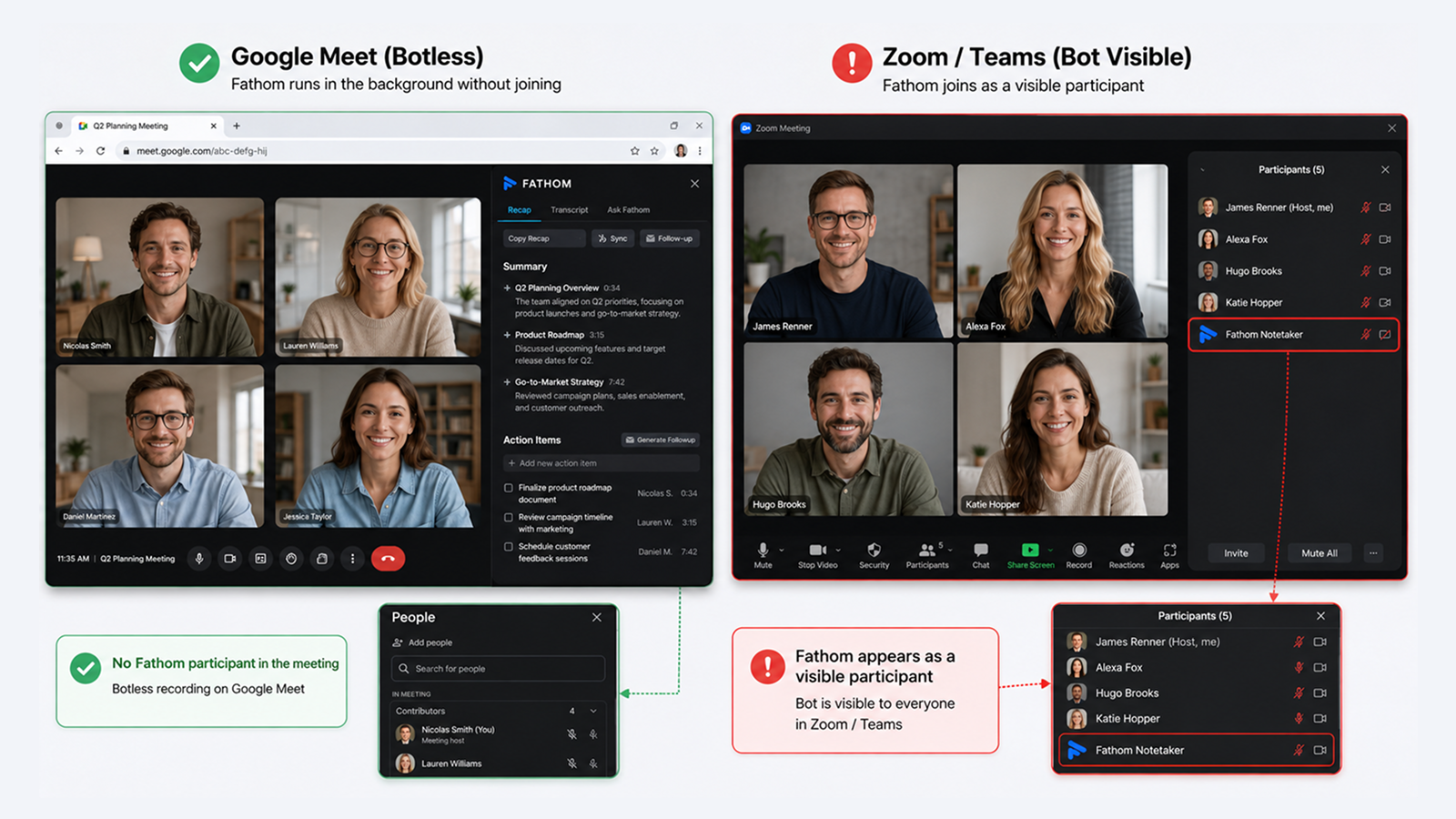
Fathom Desktop is useful, but its botless recording is narrower than some buyers expect. On Google Meet, Fathom can avoid a visible meeting participant by pairing the desktop app with a Chrome extension. On Zoom and Microsoft Teams, Fathom still uses a visible participant through its app integration.
What works well:
Unlimited free recording and transcription.
Simple meeting summaries and action items.
SOC2 Type II, HIPAA, and GDPR support.
38 supported languages.
Where it has limits:
Botless recording is fully available only on Google Meet.
No mobile app or in-person recording workflow.
No slide, infographic, report, or editable file outputs.
First-hand review note: Fathom is the best fit when your team runs everything in Google Meet and wants the most generous free recording limit. If your calls move between Zoom, Teams, and Google Meet, test each platform before choosing it as your main botless recorder.
Pricing: The free plan includes unlimited recording and 5 AI summaries per month. Premium starts at $15/mo.
Which Botless Meeting Recorder Should You Choose?
Choose Notta Desktop if you want botless recording and stronger post-meeting output. It is the best fit for consultants, sales teams, founders, researchers, and global teams that need meeting transcription, multilingual transcription, real-time translation, meeting summaries, action items, and deliverables that they can share – all through one platform
Otter Desktop is the pick for free, simple bot-free recording when multilingual transcription isn't a requirement. Fireflies Desktop suits teams already invested in Fireflies integrations or who want Live Assist during calls. Plaud Desktop works best when screenshots and text notes are part of the meeting workflow. Fathom Desktop is the strongest free option for Google Meet–heavy teams.
The right pick comes down to where your meetings happen, what you need from the output, and how much you're willing to pay – but every tool here removes the awkwardness of a visible bot joining the call. Most of these tools offer free plans or trials, so the fastest way to decide is to run your next real meeting through the one that fits your workflow on paper – and see which output you actually use afterward.
Frequently Asked Questions
What is a botless AI notetaker desktop app?
A botless AI notetaker desktop app records your meetings locally,capturing audio directly from your computer, without sending a bot to join as a visible participant. Everything gets transcribed and summarized by AI, just like a bot-based tool, but nothing shows up in the participant list. There's no waiting room issue, no bot getting blocked, and no "why is there a bot here?" from your client.
Is Fathom Desktop truly botless?
Only on Google Meet. Fathom achieves botless recording on Google Meet by combining its desktop app with a Chrome extension, so no visible participant is added to the room. On Zoom and Microsoft Teams, Fathom joins as a visible participant via an app integration. For fully botless recording across all platforms, Notta Desktop and Otter Desktop are the stronger options.
Is Fireflies Desktop available for download yet?
Yes, Fireflies Desktop launched in November 2025 and is available on Mac and Windows. It offers Pro, Business, and Enterprise plans – it's not available on the Fireflies free plan.
Are botless desktop recordings as accurate as bot recordings?
Yes, the recording method doesn't significantly affect transcription quality; what matters is audio quality and the underlying model. Notta Desktop achieves up to 98.86% accuracy with local recording.
Can I use these apps with Zoom, Teams, and Google Meet?
Yes, you can. Notta Desktop works with 26+ macOS apps and 17+ Windows apps, including Zoom, Teams, Meet, and Slack. Otter Desktop supports Zoom, Google Meet, and Teams. Plaud Desktop auto-detects meetings from most major conferencing apps. Fathom Desktop works across the same platforms, though botless mode is only fully enabled on Google Meet.
Does Notta have a free plan for the desktop app?
Yes, Notta's free plan gives US users 120 minutes of transcription per month. Notta Desktop is available from the Pro plan ($8.17/mo billed annually, 1,800 min/mo). You can also start a free 7-day Business trial – no credit card required.
Is botless recording legal?
It depends on your location. In most US states, one-party consent means you can legally record a conversation you're part of without notifying others. In all-party consent states (like California) and under GDPR in Europe, you'll need to inform participants before recording. Using a desktop app doesn't change these legal requirements, it just removes the visible bot notification. When in doubt, disclose that you're recording.
Final Thoughts
The best botless meeting recorder depends on what you need after the call. Notta Desktop is the best all-around choice when you want botless recording and useful outputs after the meeting. It records locally, supports Mac and Windows, works across major meeting apps, and connects to Notta Brain, Notta’s AI Meeting Execution Engine, so your meeting can become a summary, action list, report, infographic, or slide deck.

